Introduction
As a freelancer, I support AI-driven development at a large consulting firm in Japan. There, I built a workflow that combines Claude Code skills and subagents to orchestrate everything from design to deployment, and project delivery got about 3x faster.
In this post I explain how I thought about designing that skill, how I put the orchestration together, and how I kept growing it while it was in use. The architecture and design patterns are general, so they should apply to any domain.
Background: we adopted AI-driven development, but every deliverable looked different
My client was doing AI-driven development on every project, and all the implementation work for their customers was done with Claude Code. But watching how it was used, I saw a big problem.
Each team member was typing their own prompts by hand.
Why is that a problem?
- Deliverables weren’t consistent. For the same “build this feature”, A’s project had a design document and B’s didn’t. Some people wrote tests and some didn’t. Document formats differed from person to person
- The process wasn’t consistent. Some people put their work through review and some didn’t. Some jumped straight into implementation and only noticed design conflicts later
- Quality depended on prompting skill. People who were good with Claude Code got better output than people who weren’t
In short, they had adopted AI, but they hadn’t standardized the development process. For a consulting firm, the deliverables (design documents, test specifications, manuals) are what gets handed to the customer, so this hurt.
The proposal: turn the whole process into a skill, not just the implementation
So I proposed a skill that orchestrates the whole development workflow, not one that only helps write code.
The user (a team member) just says “build this feature”. Then the skill produces all of the following, in a fixed order and a fixed format:
- System design (generates the design document)
- Implementation (the code plus test code)
- Code review (generates the review report)
- Testing (runs the tests, checks coverage, generates the test specification)
- Deployment (sets up the test environment and deploys)
- User guide (generates the manual and handover material)
The goal: whoever runs it gets the same process and the same full set of deliverables.
Overall architecture: the skill is the conductor, the subagents are the players
Claude Code has two extension mechanisms: skills and subagents. Their roles split cleanly.
| Skill | Subagent | |
|---|---|---|
| What it is | Instructions Claude follows (a Markdown file) | A worker that runs in its own context |
| Good at | Defining steps, rules, and decision criteria | Doing specialized tasks |
| Context | Loaded into the main conversation | Kept separate from the main conversation |
In this design, the skill is the orchestrator (the conductor), and the subagents are personas (the players).
- The skill (one): runs the whole workflow. It checks prerequisites, gathers context, decides which persona to call in which order, and handles send-backs
- The subagents (six): the roles you find on a real development team, turned into personas: environment admin, designer, developer, reviewer, QA, and deployment manager
In other words, it maps the division of labor in a real development team straight onto AI agents.
The orchestration flow
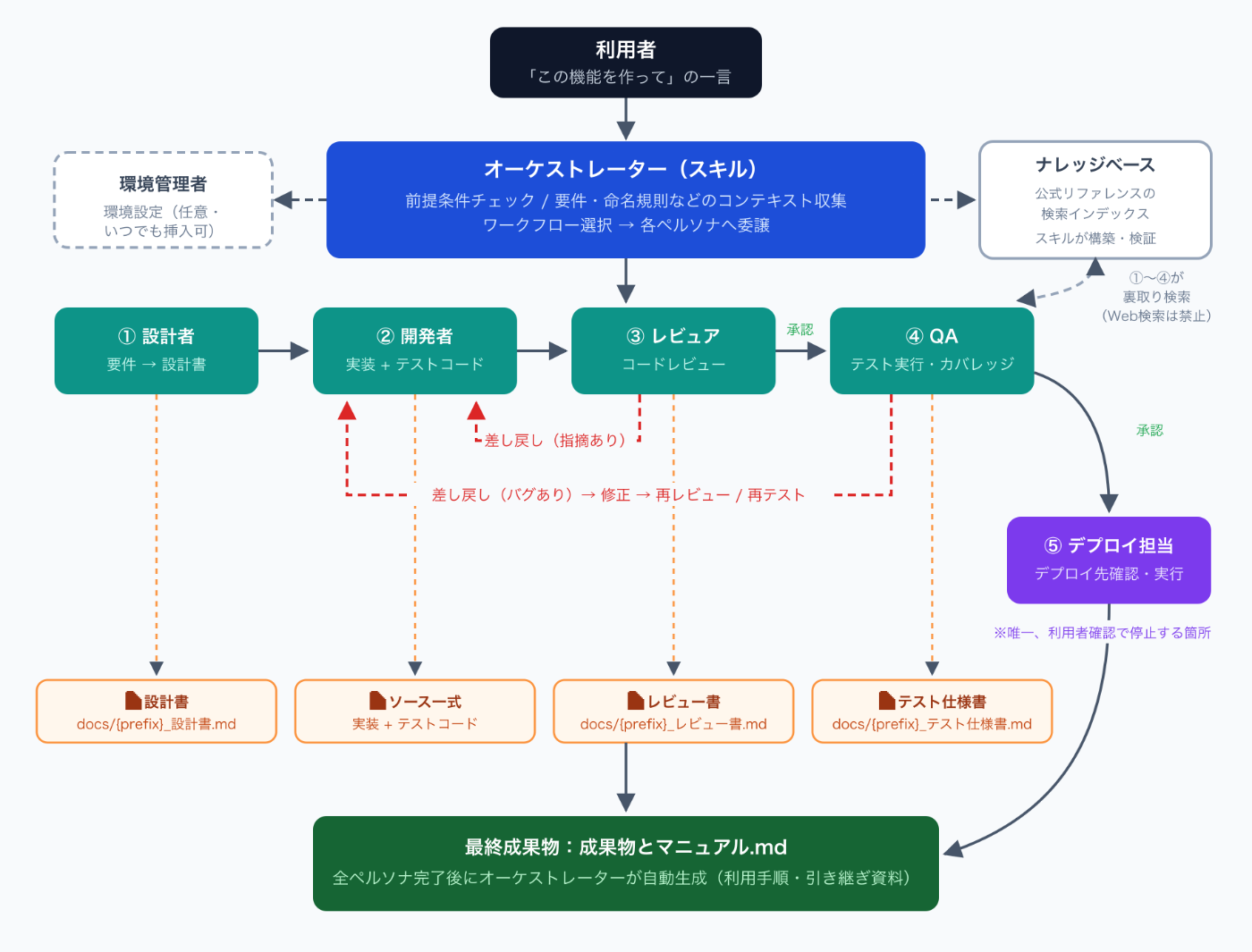
Here’s how it flows:
- The user asks, “build this feature”
- The orchestrator (the skill) starts, checks prerequisites, and gathers context (it also builds and verifies the knowledge base I describe later)
- Designer → developer → reviewer → QA run one after another as subagents, without asking for confirmation
- If review or QA finds a problem, the work is sent back to the developer automatically, then reviewed and tested again after the fix
- Only the deployment manager stops to ask the user where to deploy (this is the one place a human has to decide)
- After every persona is done, the orchestrator automatically generates a summary document of all deliverables and the manual
Directory structure
As a plugin, it’s laid out like this (names are examples):
my-dev-workflow/
├── .claude-plugin/
│   └── plugin.json          # Plugin definition
├── skills/
│   └── dev-workflow/
│       ├── SKILL.md          # The orchestrator itself
│       ├── references/       # Design document templates and best practices
│       └── knowledge/        # Local copy of the official reference (more on this later)
└── agents/
    ├── designer.md           # Designer
    ├── developer.md          # Developer
    ├── reviewer.md           # Reviewer
    ├── qa.md                 # QA
    ├── deploy-manager.md     # Deployment manager
    └── org-admin.md          # Environment admin
SKILL.md is the orchestrator, and each file under agents/ is a persona. A subagent is defined in a Markdown file with frontmatter, like this:
---
name: designer
description: Designer. Turns requirements into an architecture and writes a design document detailed enough that the developer can implement it without guessing.
model: opus
tools: Read, Write, Bash, Grep, Glob
---

# Designer

You are a solution architect. Take the requirements and...
The point is that you can limit which tools each persona can use with tools, and switch the model with model. Roles that need deep thinking, like the designer, get a stronger model; roles that are mostly mechanical get a lighter one.
What mattered most in the design: the orchestrator’s delegation rules
Once I built it, I found that this architecture succeeds or fails almost entirely on how work is delegated to the subagents.
Subagents start with no context
A subagent runs in its own context. That means it starts knowing nothing about what was decided in the main conversation: the requirements, the project path, naming rules, or what the previous persona produced.
So I spelled out in SKILL.md the context that must always be passed on when delegating:
Each subagent runs in its own context, so when delegating,
always pass the following explicitly:

1. The user's requirements (a summary of the original prompt)
2. The project path (absolute path of the working directory)
3. Information about the target environment
4. Paths to the previous persona's deliverables (design document path, review findings, etc.)
5. Fix instructions, when work is sent back
6. Document naming rules (prefix, etc.)
Without this, subagents interpret the requirements their own way or put their output in random places. You could almost say passing everything the orchestrator knows on to the next persona, without gaps, is the orchestration.
Force deliverables into files
The other important rule is making every persona write its output to a file. I explicitly banned reporting results only in the chat.
| Persona | Deliverable |
|---|---|
| Designer | docs/{prefix}_design.md |
| Developer | Source code + test code |
| Reviewer | docs/{prefix}_review.md |
| QA | docs/{prefix}_test-spec.md |
| Deployment manager | Deployment scripts + environment info |
| (after everyone is done) | docs/{prefix}_deliverables-and-manual.md |
Even the file name prefix (detected automatically from the ticket number or branch name) follows a rule, so whichever project’s repository you open, the same documents are in the same place in the same format. That’s how “consistent deliverables” is actually implemented.
The review report is always generated, whether the work was approved or sent back. That way, even with zero send-backs, there’s a record that a review happened, and it’s part of what gets delivered.
The feedback loop is a normal part of the workflow, not an exception
Just like in a human development process, it’s normal for review and QA to find issues. So I defined send-backs not as exception handling but as a regular step built into the design.
Reviewer → Developer (issues found) → Reviewer (re-review)
QA       → Developer (bugs found)   → QA (re-test)
When work is sent back, the orchestrator delegates to the developer again, passing:
- Who sent it back (reviewer or QA)
- The full text of the findings (quoted from the review report or test specification)
- The paths of the files to fix
- The path of the original design document (so the developer can go back to the design)
This loop also runs automatically, without asking the user. “Send back → fix → re-review” just keeps going, and once it’s approved, the next step starts.
It stops in only one place
During the full workflow, the only time it asks the user anything is to confirm where to deploy. Asking “can I go on?” between steps would defeat the point of automating. Deployment, on the other hand, can break an environment, so a human must decide there. Where to stop and where not to stop made a big difference to how usable it was in practice.
Fighting hallucinations: forcing fact-checks against a knowledge base
Another thing that helped a lot in practice was guarding against hallucinated API details.
The API reference for the target platform is huge. If you rely only on the LLM’s memory, it confidently writes methods and parameters that don’t exist. Web search can’t be fully trusted either, since it picks up information for other versions and unofficial sources.
So I bundled the official reference documentation (over 1,000 pages) with the skill and indexed it with a local semantic search tool. Then I made these rules for every persona:
- When writing API details (classes, methods, signatures, etc.), always search the local knowledge base to confirm them
- No web search for looking up API details (the bundled docs are the single source of truth)
- Never state a signature as fact from memory or guesswork. Mark anything uncertain as “needs confirmation”
These rules go into every delegation prompt. Deciding “this is the source of truth, and nothing else” made the API-related parts of the generated code visibly more accurate.
Guardrails: let the agent say “I don’t know”
One more interesting design point: I gave the developer persona a way to stop instead of pushing ahead when a prerequisite is missing.
For example, if it can’t find the data model definition it needs to write test code, the developer doesn’t make up a plausible schema. It returns a halt report in a fixed format:
GUARDRAIL_HALT: missing_definitions
---
missing_objects: ...
missing_fields: ...
When the orchestrator sees this, it gives the user these options:
- A. Enter the definitions here
- B. Fetch the real definitions from the target environment
- C. Generate a scaffold with default values (fix it later)
- D. Skip it this time
LLMs are far too good at “filling in something plausible when they don’t know”. It’s safer to have them return “I don’t know” as a structured signal and handle it in the orchestrator. That’s also why subagents never talk to each other directly; everything goes through the orchestrator.
A skill isn’t done once you build it: how it grew in use
Much of what I’ve described so far didn’t exist in the first version. Looking back at the change history, the skill grew through five big stages. It’s a record of the months since the first version, writing every problem we found on real projects back into the skill as rules.
Stage 1: the skeleton of the workflow
The first version had only the orchestrator skill itself, the six personas, a best-practices collection, and evaluation scenarios. Even then, the “design → develop → review → QA → deploy” flow already worked. Shipping the skeleton first and putting it to use was the right call. Running it on real projects and collecting problems is faster than trying to build it perfectly.
Stage 2: bundling the knowledge base
The first big problem in use was the API hallucination I described above. This is the stage where I crawled the official reference, bundled it with the skill, and made it searchable with semantic search.
I also turned small accidents from real use into rules. For example, one automation definition was deployed in its enabled state and changed how the existing test environment behaved, so from then on the rule is always generate them disabled. And when someone asked for a review only, the review report generation got skipped, so I made it mandatory at this point too.
Stage 3: closing the LLM’s shortcuts with gates
This is the stage I learned the most from. In real use, it became clear that LLMs happily skip steps.
- Choosing a partial workflow skipped review and QA and went straight to deployment
- The final deliverables and manual were only generated under certain conditions
As a fix, I made review approval and test approval required gates before deployment. There’s even a guard clause: if the review report and test specification don’t exist, stop the deployment and report it. I also changed the final document to “always generate it after the last persona finishes, whatever the conditions”.
The lesson here is clear: just writing “do X” doesn’t get it done. It only works as a gate once you also write “if X doesn’t exist, stop and report”.
Automatic detection of the document prefix (to stop files being overwritten when several tickets run in parallel), standardized naming rules, and the GUARDRAIL_HALT mechanism above all came in at this stage. Every one of them started from an accident that really happened.
Stage 4: making the personas real subagents
In the early setup, the persona definitions actually lived inside the skill’s directory, and the orchestrator had to role-play each one through the prompt. At this stage I moved them into the agents/ directory, so Claude Code could start them as proper subagents.
That made the context separation real, and per-persona tool limits and model choices started working. The tools and model frontmatter fields I showed earlier came from this move.
I also changed how the knowledge base search is wired in, from an MCP server to running the CLI directly. With MCP there were many things that could break: registering the server, the allowlist for each subagent, re-establishing the connection. If one command does the job, there are fewer points of failure. At the same time I added a rule to always check that the index isn’t empty after setup. An empty knowledge base just returns zero results, so the agent carries on believing “I searched and found nothing”. That silent degradation is the scariest failure of all.
Stage 5: feeding lessons from real projects back as playbooks
In the most recent stage, I wrote the steps we found while troubleshooting real projects back into the skill’s reference docs as “playbooks”, and added a supporting persona that specializes in troubleshooting.
At this point the skill isn’t just an automation tool anymore; it’s the organization’s knowledge asset. A problem solved once on one project is something everyone’s Claude Code already knows on the next one. This loop of writing lessons back into the skill is, I think, the best part of the whole skills idea.
The result: 3x faster delivery
After the client adopted this skill, project delivery became about 3x faster than before.
Breaking down why, it wasn’t really the raw implementation speed. Three things mattered most:
- Less rework. The order design → implementation → review is enforced, so “building it, then finding the design contradicts itself” went away
- Documentation costs nothing now. The design document, review report, test specification, and manual all fall out of the development flow as by-products. The time we used to spend writing them all just before delivery disappeared
- Differences in prompting skill disappeared. With one line, “build this feature”, anyone runs a flow of the same quality
The second one matters a lot for a consulting firm, because preparing the documentation to deliver used to take about as long as the implementation.
Summary: a checklist for designing orchestration
If you build a similar workflow skill, these are the points to get right:
- Skill = conductor, subagents = players. Put steps and rules in the skill, and specialized work in the personas
- Model the personas on a real development team. The split into designer, developer, reviewer, QA, and deployment manager works just as well with AI
- Spell out the context you pass on when delegating. Subagents start knowing nothing. Write the list of what to pass in SKILL.md
- Force deliverables into files. Deliverables only become consistent once paths, naming rules, and templates are all fixed
- Design send-backs as a normal part of the workflow. The feedback loop is not an exception
- Stop in only one place. Ask a human right before destructive operations, and run non-stop everywhere else
- Pick one source of truth and force fact-checks against it. Bundling the official docs with local search crushes hallucinations
- Have agents return “I don’t know” as a structured signal. Let the orchestrator handle the guardrails
- Block skipped steps with required gates plus stop conditions. “Do X” alone isn’t followed
- Write what you learn in use back into the skill. If you keep turning accidents and troubleshooting steps into rules and playbooks, the skill becomes the organization’s knowledge asset
Claude Code skills and subagents are useful on their own, but combined into a “team”, they can standardize the development process itself. And after you build it, you can keep growing it by writing back what you learn. That was the biggest lesson from this project.
Comments
Comments live in GitHub Discussions. Loading them connects this page to giscus.app.