Introduction
The 2026 World Cup is on right now. To enjoy the tournament a bit more, I built an AI that predicts match results from real data.
But a one-off prediction felt a little thin. It gets more interesting, more like an AI, when it can look back at past matches and past predictions and ask, “what happened in situations like this one?”
An LLM on its own can’t look up past predictions or match results that aren’t in its input. So I built episodic memory: a way to search for the relevant past cases and pass them into the prompt.
This post is about building that episodic memory for a prediction bot with TiDB. The key is TiDB’s hybrid search (vector, full-text, and SQL in one database). I also built a web UI where you pick a match in the browser and get a prediction.
Running the experiments, I also found that how you hand over the memory changes the hit rate. That was the most interesting part.
What I built
Here’s the web UI. Pick a match and it predicts it two ways: “without memory” and “with memory”. You can pick two kinds of matches:
- Upcoming matches (not played yet, so the prediction uses no results)
- Past matches (the result is known, so you can check the answer)
This is what it looks like in action (pick a match → recall memories → predict without and with memory):
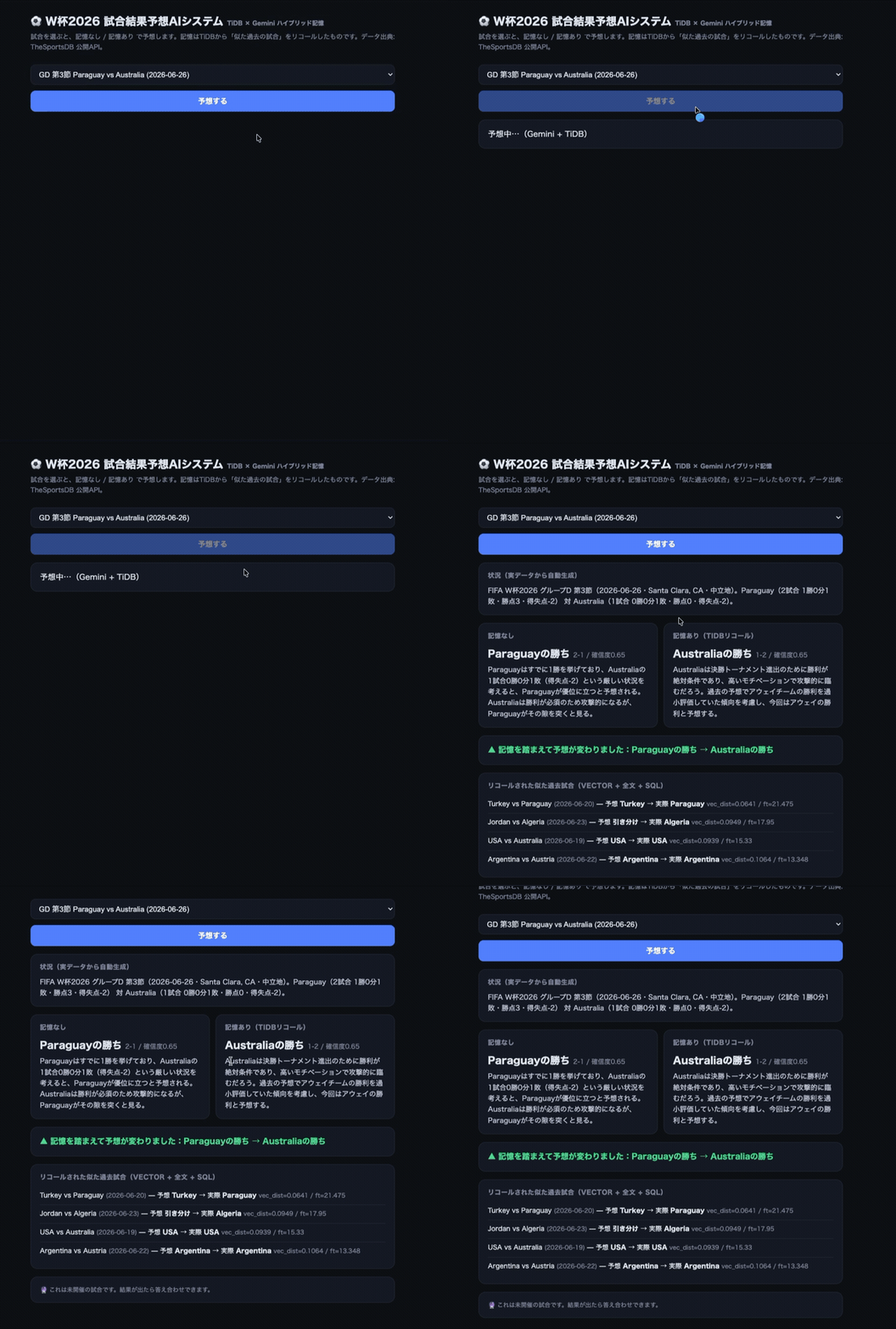
Behind the scenes, the flow is:
- Build the situation of the chosen match from only the real results known at that point
- Recall “similar past matches” with TiDB’s hybrid search
- Pass those memories to Gemini and have it predict
- (For past matches) check the prediction against the actual result
The data comes from TheSportsDB’s public API (league id 4429 = FIFA World Cup, season 2026), fetched by date. When I fetched it, I had 40 finished matches and 11 not yet played.
The problem: recalling “memories” is harder than it looks
To give a prediction AI past cases, you have to store past predictions and results in a database and pull out similar matches. But when I wrote down how I wanted to search, a plain vector database alone wasn’t enough.
These were the conditions I wanted to recall memories by:
| Search | What it finds | Example |
|---|---|---|
| Vector | Situations that are similar in meaning | A setup like “a favorite with two wins vs. a mid-table side with one win and one loss” |
| Full-text | Shared keywords | Team names, “matchday 3”, “points” |
| SQL | Structured conditions | resolved, was_correct=0, confidence>=0.6 |
The catch is that I want to search with all of them mixed: “among predictions filtered to was_correct = 0, the closest in meaning”, that kind of combination of structured filter, vector, and keyword. Split that across separate databases (a vector DB, Elasticsearch, and a relational DB) and it gets painful fast: write everything three times, then join the results in the app.
I wanted to do it all in one database. That’s where TiDB came in.
The solution: episodic memory with just TiDB
TiDB Cloud Serverless lets one table hold a VECTOR column, a full-text index, and ordinary columns side by side, and you query all of them with SQL.
CREATE TABLE prediction_memory (
  id              BIGINT PRIMARY KEY AUTO_INCREMENT,
  home_team       VARCHAR(64),
  away_team       VARCHAR(64),
  match_date      DATE,

  situation_text  TEXT,           -- the situation, in natural language
  situation_vec   VECTOR(768),    -- the embedding of the text above

  predicted_outcome VARCHAR(8),   -- HOME / DRAW / AWAY
  confidence        FLOAT,
  actual_outcome  VARCHAR(8),
  was_correct     TINYINT,        -- set after the match
  resolved_at     DATETIME,

  FULLTEXT INDEX ft_situation (situation_text) WITH PARSER MULTILINGUAL
);
For embeddings I used Gemini’s gemini-embedding-001, truncated to 768 dimensions.
from google import genai
from google.genai import types

client = genai.Client(api_key=...)

def embed(text: str) -> list[float]:
    r = client.models.embed_content(
        model="models/gemini-embedding-001",
        contents=text,
        config=types.EmbedContentConfig(
            task_type="SEMANTIC_SIMILARITY",
            output_dimensionality=768,
        ),
    )
    return list(r.embeddings[0].values)
Build the situation from real data only
For the situation text (situation_text) that goes into the prediction, the important thing was not to mix in anything without a source. It’s computed from only the real results before that match.
# Example: compute the standings just before the match from real results, and write them out.
# (The app writes this in Japanese; translated here.)
"FIFA World Cup 2026, Group B, matchday 3 (2026-06-24, Vancouver, BC, host nation at home).
 Switzerland (2 played: 1 win, 1 draw, 0 losses, 4 points, goal difference +3) vs
 Canada (2 played: 1 win, 1 draw, 0 losses, 4 points, goal difference +6, host nation with home advantage)."
The data comes from TheSportsDB’s public API (league id 4429 = FIFA World Cup, season 2026). I only use matches, scores, and the standings computed from them. Nothing subjective like “they seem unmotivated” goes in.
The “home” trap: World Cup matches are mostly at neutral venues
One thing to watch in World Cup predictions is not to treat “home team” as “has home advantage”. In this implementation, only the three hosts (USA, Canada, Mexico) playing in their own country count as having home advantage. Everywhere else, “home” and “away” are just how the fixture is written.
Switzerland vs Canada, for example, was played in Vancouver, Canada. On paper Switzerland is the home team, but the one with home advantage is the host, Canada. So the code looks at the venue’s country in the API (strCountry), writes “home advantage” into the situation text only when a host plays in its own country, and the prompt tells the model not to assume a home advantage anywhere else.
HOSTS = {"USA": "United States", "Canada": "Canada", "Mexico": "Mexico"}

def host_advantage(team, country):
    # True only when a host team plays at a venue in its own country
    return bool(country) and team in HOSTS and HOSTS[team] in country
Hybrid recall (the core)
To recall similar past matches, I take a vector search ranking and a full-text search ranking separately and merge them with RRF (Reciprocal Rank Fusion). The nice thing about TiDB is that the same SQL filters (resolved_at IS NOT NULL, and for backtesting “before this match”, match_date < :before_date) apply to both.
The vector side:
SELECT id, home_team, away_team, situation_text, match_date,
       predicted_outcome, actual_outcome, was_correct,
       VEC_COSINE_DISTANCE(situation_vec, :qvec) AS vec_dist
  FROM prediction_memory
 WHERE resolved_at IS NOT NULL
   AND match_date < :before_date
 ORDER BY vec_dist ASC
 LIMIT 20;
The full-text side (TiDB uses FTS_MATCH_WORD(); more on how much this tripped me up below):
SELECT id, home_team, away_team, situation_text,
       FTS_MATCH_WORD(:qtext, situation_text) AS ft_score
  FROM prediction_memory
 WHERE FTS_MATCH_WORD(:qtext, situation_text)
   AND resolved_at IS NOT NULL
   AND match_date < :before_date
 ORDER BY ft_score DESC
 LIMIT 20;
Then fuse the two results with RRF:
def _rrf_fuse(vhits, fhits, k, kconst=60):
    pool, score = {}, {}
    for rank, r in enumerate(vhits):
        pool.setdefault(r["id"], {}).update(r)
        score[r["id"]] = score.get(r["id"], 0.0) + 1.0 / (kconst + rank)
    for rank, r in enumerate(fhits):
        pool.setdefault(r["id"], {}).update(r)  # the same row keeps both vec_dist and ft_score
        score[r["id"]] = score.get(r["id"], 0.0) + 1.0 / (kconst + rank)
    return sorted(pool.values(), key=lambda r: -score[r["id"]])[:k]
Why TiDB
Everything so far lives in one database, in SQL. With other stacks it splits three ways (vectors in a dedicated DB, full-text in Elasticsearch, structured filters in a relational DB), and a filtered search like “filter to was_correct = 0, then vector search” makes the design much more complicated.
With TiDB, VEC_COSINE_DISTANCE(), FTS_MATCH_WORD(), and WHERE match_date < ... are all SQL against the same table. For agent memory, where you want to mix “structured conditions × meaning × keywords” every time, that made things so much easier.
By the way, this is a hand-built version of what existing agent memory platforms do, made to understand how it works. Building it yourself first and then switching to a memory platform that fits your use case is a fine way to go, too.
Results
An upcoming match (not played yet)
Here I had the web UI predict “Paraguay vs Australia (Group D, matchday 3)”. The match hadn’t been played when I fetched the data, so there’s no answer to check.
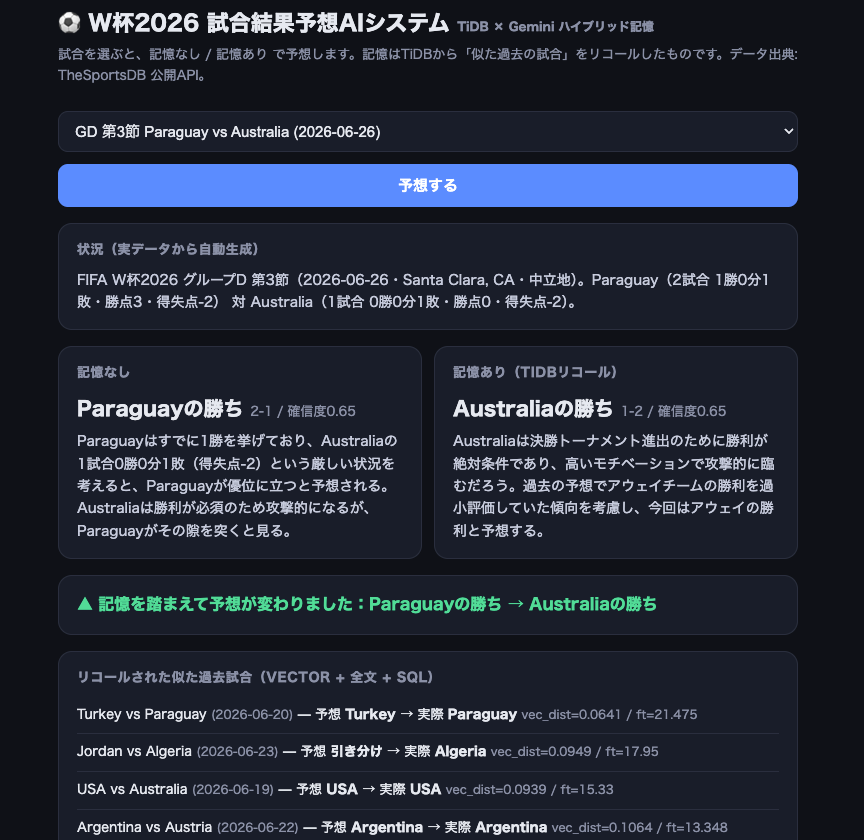
- Without memory: Paraguay to win
- With memory: Australia to win
Recalling similar past matches changed the prediction itself. You can see the memory moving the bot’s judgment. (Once the match is played, the answer can be checked.)
Checking against a past match
Next, “France vs Senegal (Group I, matchday 1)”. This one has a result, so we can check it.
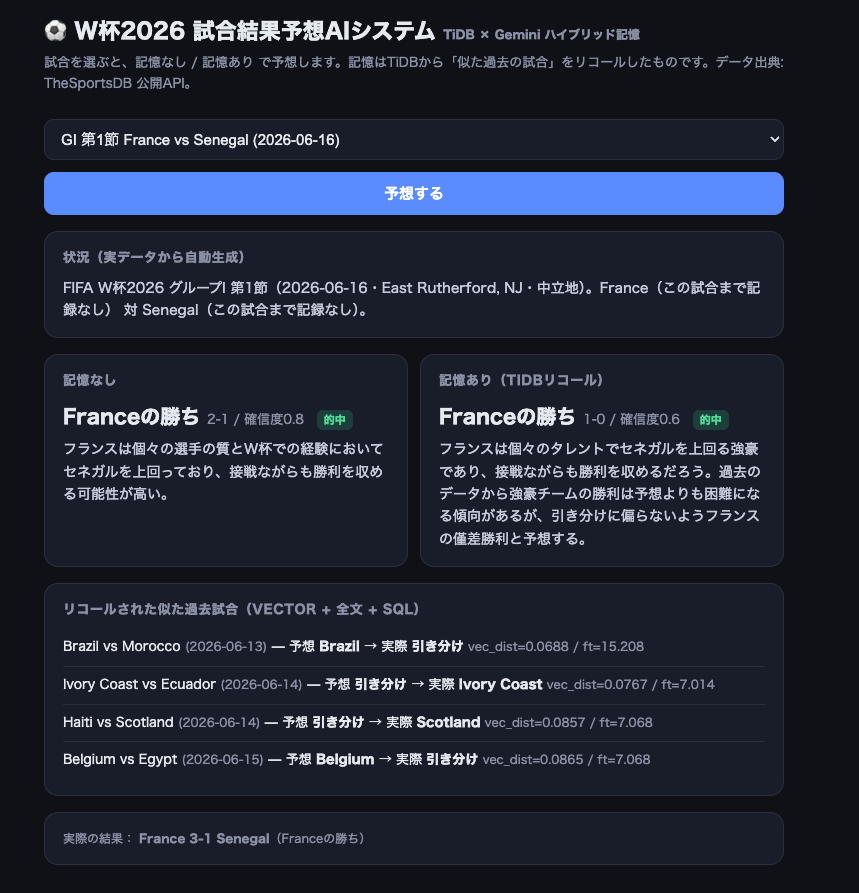
- Without memory: France to win, 2-1 → correct
- With memory: France to win, 1-0 → correct (actual: France 3-1 Senegal)
The memories it recalled were similar opening matches like Brazil vs Morocco and Ivory Coast vs Ecuador. It looked at how those actually ended, calibrated its confidence, and still correctly picked the stronger side, France. You can see both vec_dist (closeness in meaning) and ft (keyword match) doing work to pull up the past matches.
Evaluation: how you make it remember moves the accuracy
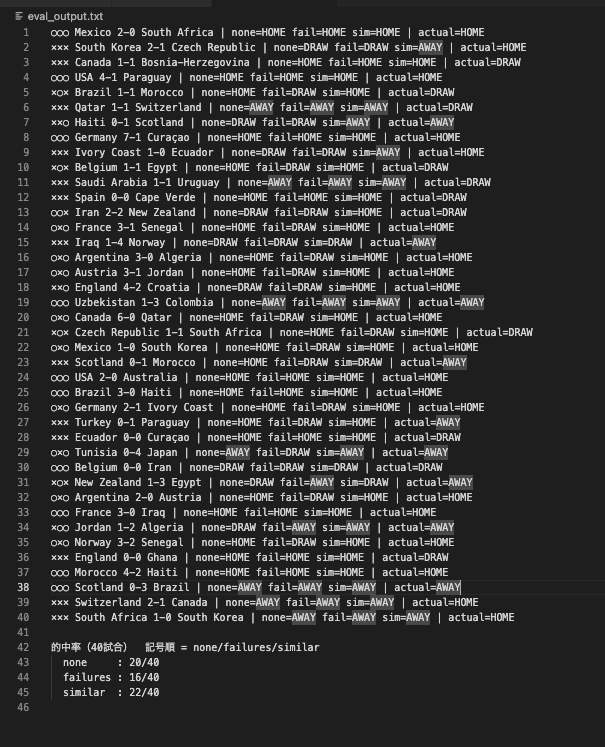
I predicted the 40 finished matches in three modes and compared the hit rates. To avoid leaks, memory is limited to match_date < that match.
| Mode | How it remembers | Correct |
|---|---|---|
| none | No memory (facts only) | 20/40 |
| failures | Only similar wrong predictions (naive version) | 16/40 |
| similar | Similar past matches, as “prediction vs actual” (calibrated version) | 22/40 |
Two things came out clearly:
- Naive memory (failures) was the worst, at 16/40. When I passed in only past predictions that missed, many of those misses happened to be draws, so the bot started leaning toward “draw” for everything and broke predictions it had been getting right. Tell it only “avoid your failures”, and it gets dragged toward the shape of those failures.
- The calibrated version (similar) beat no memory, 22 vs 20. Passing similar past matches as “prediction plus actual result” avoided the draw bias and picked up matches that the no-memory version missed. For example, without memory it predicted a draw for England vs Croatia and got it wrong; with memory it recalled similar opening matches and correctly picked the stronger side, England.
With only 40 matches I won’t call this conclusive, but it clearly showed that what you make it recall, and how (the memory design), moves the accuracy. Remembering only failures backfires; remembering similar cases together with their results works. When you give an agent memory, this design is the key.
Where I got stuck (a first try at TiDB, for real)
This part might be the most useful. Here’s what tripped me up the first time I used TiDB.
1. You can’t create tables in the sys database
The connection dialog’s default database is sys, and CREATE TABLE there gave me CREATE command denied. sys is a system database. Create your own:
CREATE DATABASE wc2026;2. Full-text search isn’t MATCH ... AGAINST
Writing it MySQL-style, MATCH(col) AGAINST('...'), gave me UnknownType: *ast.MatchAgainst. TiDB’s full-text search is FTS_MATCH_WORD(search terms, column).
3. FTS_MATCH_WORD is needed in the WHERE clause too
Using it only as a score in SELECT is an error:
'FTS_MATCH_WORD()' in SELECT must ... be used with a corresponding
'FTS_MATCH_WORD()' in WHERE.
“Filter to matching rows (WHERE)” and “get the score (SELECT)” go together.
4. Full-text and vector search need a TiFlash (columnar) replica
Full text search can be only executed in a columnar storage (TiFlash),
but it is not available.
They run on TiFlash, the columnar engine, so add a replica and allow reads from it in the session:
ALTER TABLE prediction_memory SET TIFLASH REPLICA 1;
SET tidb_isolation_read_engines = 'tikv,tiflash';
5. Right after TRUNCATE, wait for the replica to resync
I was running TRUNCATE every time I rebuilt the data, and the full-text search right after it said “TiFlash not available”. You have to wait until AVAILABLE in information_schema.tiflash_replica becomes 1.
6. Check which embedding model names your environment has
Specifying text-embedding-004 gave 404 NOT_FOUND. Checking with models.list(), my environment had gemini-embedding-001. It’s safer to check the list than to hard-code a name.
Summary
- An LLM on its own is stateless. Adding episodic memory with TiDB let me recall with vector (similar situations), full-text (shared keywords), and SQL (structured conditions) mixed, in one database.
- For agent memory, where you want to mix “structured conditions × meaning × keywords” every time, TiDB’s hybrid search is a very good fit. The full-text side has its gotchas (TiFlash, the
FTS_MATCH_WORDrules), but once it works, you write everything in SQL, and it’s pleasant. - Evaluated on real data, how it remembers moved the accuracy. Recalling only failures backfires; recalling similar cases together with their results is the safe choice. More than the content of the memory, the design of what to recall, and how, is what matters.
The code and the script that fetches the real data can be reproduced with the TiDB Cloud Serverless free tier and a Gemini API key.
Comments
Comments live in GitHub Discussions. Loading them connects this page to giscus.app.