Introduction
On May 28, 2026, Anthropic introduced dynamic workflows in Claude Code. According to the official blog, Claude writes an orchestration script on the fly, runs tens to hundreds of subagents in parallel inside one session, and verifies the results before returning them to you.
Source: Introducing dynamic workflows in Claude Code
In this post I stick to what I could confirm in Anthropic’s official blog and the official Claude Code docs, and organize how dynamic workflows work, how to start them, how to manage a run, permissions, cost, and where they are available.
Dynamic workflows extend normal subagent use for large, long-running jobs. They target work that is hard to handle in a single conversation: investigating a whole codebase, large migrations, reviewing a plan from several angles, and so on.
I don’t cover plan support, version numbers, or unpublished internal behavior that I couldn’t confirm in the official blog or the dynamic workflows docs.
What are dynamic workflows?
With dynamic workflows, a runtime executes a JavaScript script that Claude wrote, and that script coordinates many subagents. The official docs explain the difference between subagents, skills, and workflows by asking “who holds the plan?”
Source: Orchestrate subagents at scale with dynamic workflows
| Subagents | Skills | Workflows | |
|---|---|---|---|
| What it is | Workers that Claude spawns | Instructions that Claude follows | A script the runtime executes |
| What decides the next step | Claude | Claude | The script |
| Where intermediate results live | Claude’s context | Claude’s context | Script variables |
| What you can reuse | Worker definitions | Instructions | The orchestration |
| Scale | A few delegations per turn | About the same as subagents | Tens to hundreds of agents per run |
| When interrupted | Rerun the turn | Rerun the turn | Resumable within the same session |
The key point is that the plan moves out of the conversation and into a script. Loops, branches, and intermediate results are handled in the script, which makes it easier to send only the final result back into Claude’s conversation context.
When to use them
The official blog and docs list uses like these:
Source: official blog, official docs
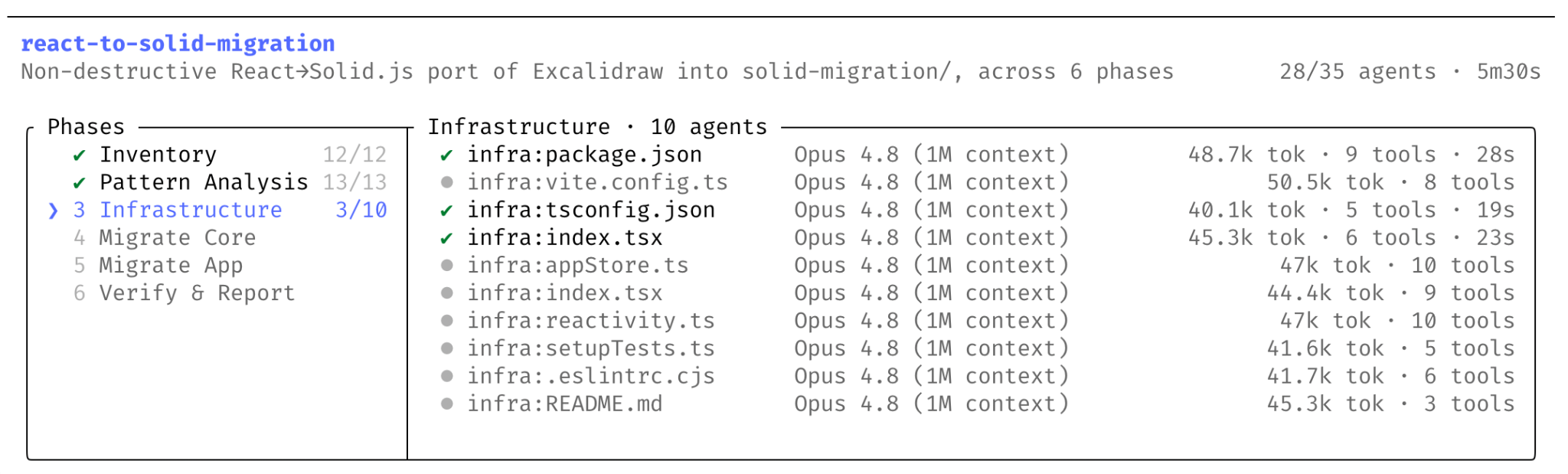
- Codebase-wide bug hunts, profiler-driven optimization audits, and security audits
- Framework migrations, API deprecation work, and language ports that span hundreds or thousands of files
- Plans and research that need high accuracy, verified from several independent angles
What matters most is that this isn’t just about lining up more agents. Dynamic workflows make it easy to set things up so one agent verifies what another found, or so several drafts are written and then attacked for each other’s weaknesses.
How a run works
The basic flow looks like this:
Your request
  ↓
Claude plans the workflow
  ↓
Claude writes a JavaScript script
  ↓
The runtime runs it in the background
  ↓
Many subagents work in parallel
  ↓
Results are verified and merged
  ↓
You get a single answer
According to the official docs, a workflow runs in an isolated environment separate from your Claude Code conversation, and intermediate results are kept in script variables. Progress is tracked too, so within the same session you can pause a run and resume it later.
Source: How a workflow runs
Limits
These are the main limits listed in the official docs:
Source: Behavior and limits
| Limit | Why |
|---|---|
| No user input during a run | Split stages that need approval into separate workflows |
| The workflow itself has no direct file system or shell access | Agents do the reading, writing, and command execution |
| At most 16 agents run at once | Keeps local resource use down |
| 1,000 agents in total per run | Prevents runaway loops |
“Up to 16 in parallel” and “1,000 agents” are the limits in the docs. The number that actually runs at once may be lower, depending on things like your machine’s CPU core count.
How to start one
There are three main ways to start a dynamic workflow.
Source: Have Claude write a workflow
1. Put workflow in your prompt
To run a one-off task as a workflow, include the word workflow in your prompt.
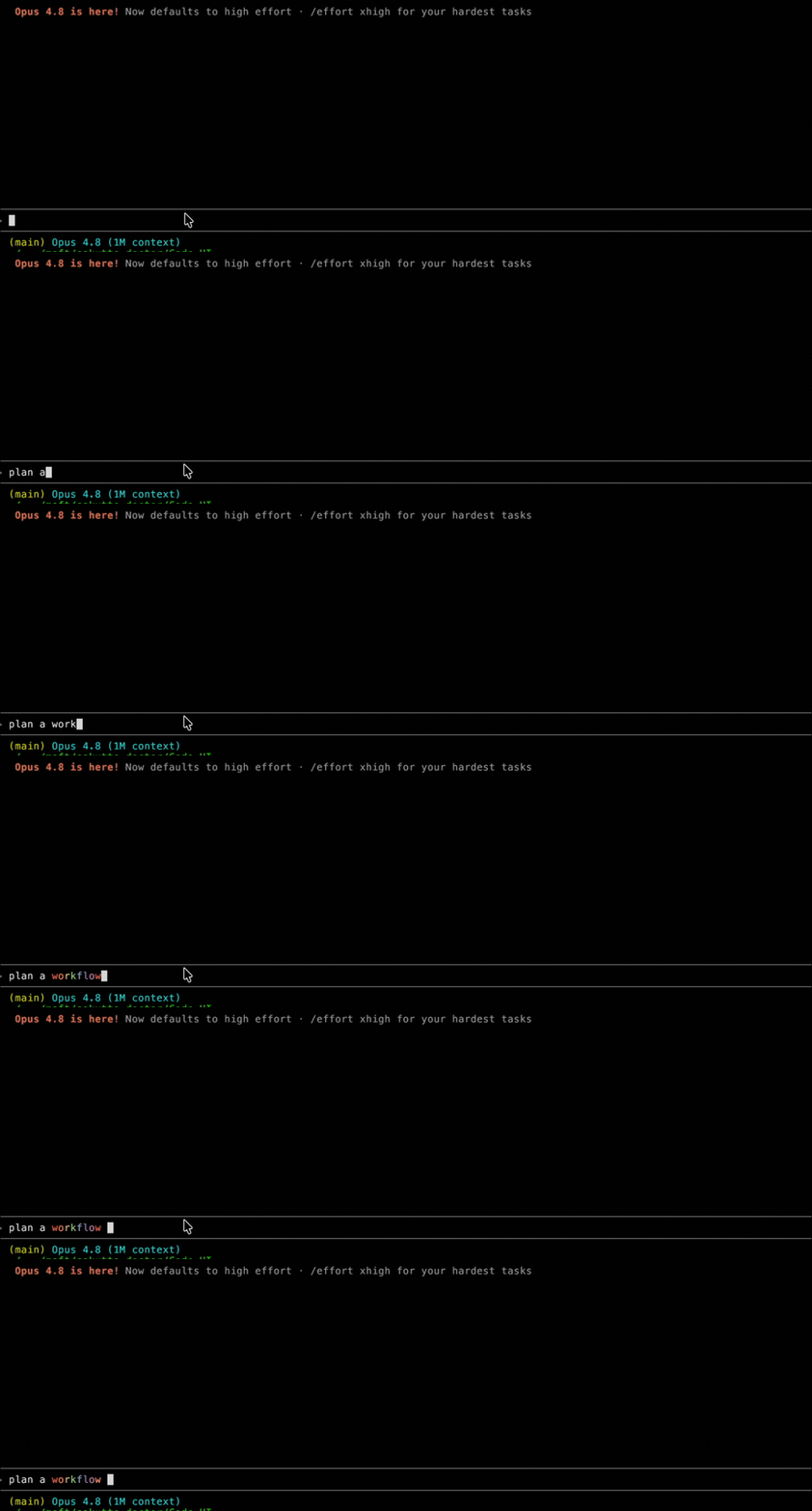
Run a workflow to audit every API endpoint under src/routes/ for missing auth checksClaude Code highlights workflow as you type and starts writing a workflow script instead of working turn by turn. As in the example below, Claude Code automatically tags the word workflow as a dynamic workflow trigger and shows it in rainbow text. If you trigger it by accident, press Alt+W (Option+W on macOS) to ignore it for that prompt.
Source: Ask for a workflow in your prompt
2. Use ultracode
ultracode is a Claude Code setting that combines xhigh reasoning effort with automatic workflow orchestration.
/effort ultracodeWith it on, Claude decides for each substantial task whether to use a workflow. One request can turn into several workflows, for example understanding the code, making the change, and verifying it.
ultracode only lasts for the current session. To go back to normal work, switch to /effort high.
3. The built-in /deep-research workflow
Claude Code ships with /deep-research, a built-in workflow for research.
/deep-research What changed in the Node.js permission model between v20 and v22?The official docs describe it as a workflow that searches the web from several angles, fetches and cross-checks sources, and returns the claims that pass verification as a report with citations.
Monitoring and saving a run
Workflows run in the background. You can check running and finished workflows any time with /workflows.
Source: Watch the run
/workflowsThe progress view shows the number of agents in each phase, total tokens, and elapsed time.
| Key | Action |
|---|---|
↑ / ↓ | Select a phase or agent |
Enter / → | Open the details of a phase or agent |
Esc | Go back one level |
j / k | Scroll the agent details |
p | Pause or resume |
x | Stop the selected agent, or the whole workflow |
r | Restart a running agent |
s | Save the script as a command |
To reuse a workflow, select it in /workflows and press s. There are two places to save it:
Source: Save the workflow for reuse
.claude/workflows/: saved in the project and shared with everyone who uses the repository~/.claude/workflows/: saved in your home directory, available only to you, in every project
After that, you can run the saved workflow as a /<name> command.
Approvals and permissions
When a workflow starts, the CLI asks you to confirm its plan. When that prompt appears depends on your permission mode.
Source: Approve the plan before it runs
| Permission mode | Approval prompt |
|---|---|
| Default / accept edits | Every time, unless you choose “don’t ask again for this workflow in this project” |
| Auto | Only the first time; skipped when ultracode is on |
Bypass permissions / claude -p / Agent SDK | Never shown |
One important detail: the permission mode only controls the prompt when a workflow starts. The subagents a workflow spawns always run in acceptEdits mode and inherit your tool allowlist, so file edits are approved automatically.
Shell commands, web fetches, and MCP tools that aren’t on your allowlist can still prompt you mid-run. For long workflows, it’s safer to add the commands you need to the allowlist beforehand.
Cost and stopping
Because dynamic workflows start many agents, they use more tokens than a normal Claude Code session. Both the official blog and the docs recommend starting with small, well-scoped tasks.
Source: official blog, Cost
Some practical ways to keep cost under control:
- Check your model with
/modelbefore a big run - For stages that don’t need a strong model, ask Claude to use a smaller one
- Stop a running workflow from
/workflows - Stopping doesn’t lose finished work, so stop early if a run grows larger than you expected
You can also turn workflows off:
Source: Turn workflows off
- Turn off dynamic workflows in
/config - Set
"disableWorkflows": truein~/.claude/settings.json - Set
CLAUDE_CODE_DISABLE_WORKFLOWS=1 - For a whole organization, turn them off in managed settings or the Claude Code admin settings
With workflows turned off, the built-in workflow commands, starting a workflow with the workflow keyword, and ultracode are all unavailable.
Where they are available
According to the official blog, dynamic workflows are a research preview available in the Claude Code CLI, Desktop, and the VS Code extension, on the Max, Team, and Enterprise plans. On Enterprise, an admin has to turn them on.
They are also listed as available through the Claude API, Amazon Bedrock, Vertex AI, and Microsoft Foundry.
Source: official blog
The official docs say they are on by default for Max and Team, and for Claude Code via the API, and off by default for Enterprise at launch.
Source: Getting started
| Plan | Status |
|---|---|
| Max | On by default |
| Team | On by default |
| Claude Code via API | On by default |
| Enterprise | Off by default; an admin can turn it on |
I don’t cover the Pro plan or specific version numbers, since I couldn’t confirm them in the official blog or the dynamic workflows docs.
Case study: rewriting Bun
The official blog presents a large case study: porting Bun from Zig to Rust.
Source: Rewriting Bun with dynamic workflows
For Jarred Sumner’s port of Bun from Zig to Rust with dynamic workflows, the blog gives these numbers:
| Item | Detail |
|---|---|
| Target | Porting Bun from Zig to Rust |
| Tests | 99.8% of the existing test suite passes |
| Code size | About 750,000 lines of Rust |
| Time | 11 days from first commit to merge |
The blog describes what the workflow did: mapping Rust lifetimes for each struct field, creating a .rs file for each .zig file, assigning two reviewers to every file, looping on fixes until the build and tests passed, and opening PRs to remove unnecessary data copies.
The blog also clearly states that this port “is not in production yet”. That’s important to keep in mind when reading the case study.
Practical patterns
A codebase-wide security audit
Run a workflow to scan the entire codebase for:
- Missing auth checks on API endpoints
- SQL injection vulnerabilities
- Unsafe deserialization patterns
- Hardcoded secrets
Have independent agents verify each finding.
Here, one approach is to explore the whole service in parallel and have separate agents verify each finding. It won’t bring false positives to zero, but it makes the review much thicker than a single pass.
A large migration
Create a workflow to migrate all React class components to functional components with hooks.
Cover all files under src/components/.
Run tests after each batch to verify behavior preservation.
For migrations across many files, workflows suit a flow where the work and the verification for each file are separate, and the results are merged step by step.
Stress-testing a plan
Create a workflow to draft our microservices migration plan from three independent angles,
then have adversarial agents try to find flaws in each approach.
Synthesize the most robust plan.
Writing several drafts and having other agents hunt for each one’s weaknesses makes it easier to find gaps and broken assumptions in a plan.
Things to watch out for
Dynamic workflows are useful, but they are a heavier way to run work than normal Claude Code. Watch out for these in particular:
- Token use tends to be high
- Long runs can stop for permission prompts midway
- A workflow can resume within the same session, but after you quit Claude Code it starts from scratch next time
- Subagent file edits are approved automatically, so check your allowlist and the scope of the run beforehand
- Don’t write about commands, limits, or plan support that aren’t in the official sources
A realistic way in is to start with a small code investigation or /deep-research, get a feel for token use, run time, and how permission prompts show up, and only then use workflows for big tasks.
Summary
Dynamic workflows are a new way to run large parallel work in Claude Code. Claude writes a workflow script, the runtime runs that script in the background, and the script coordinates many subagents.
The key points:
- The plan becomes a script, and intermediate results live in the script instead of the conversation context
- They suit work that needs tens to hundreds of subagents
- They make it easy to add verifier agents and adversarial reviews
- Within the same session, a run can be paused and resumed
- Watch your token use and permissions
A good way to start is to try something small, save the workflows that work well, and grow from there to the tasks you repeat.
Comments
Comments live in GitHub Discussions. Loading them connects this page to giscus.app.