Apple Intelligence × SwiftData × RAG (Retrieval-Augmented Generation)
This is my development log for a native macOS app that lets you talk directly with the documents (PDF and text) on your own computer, with your privacy fully protected.
Demo
A demo of FoundationLLMChat’s main features.
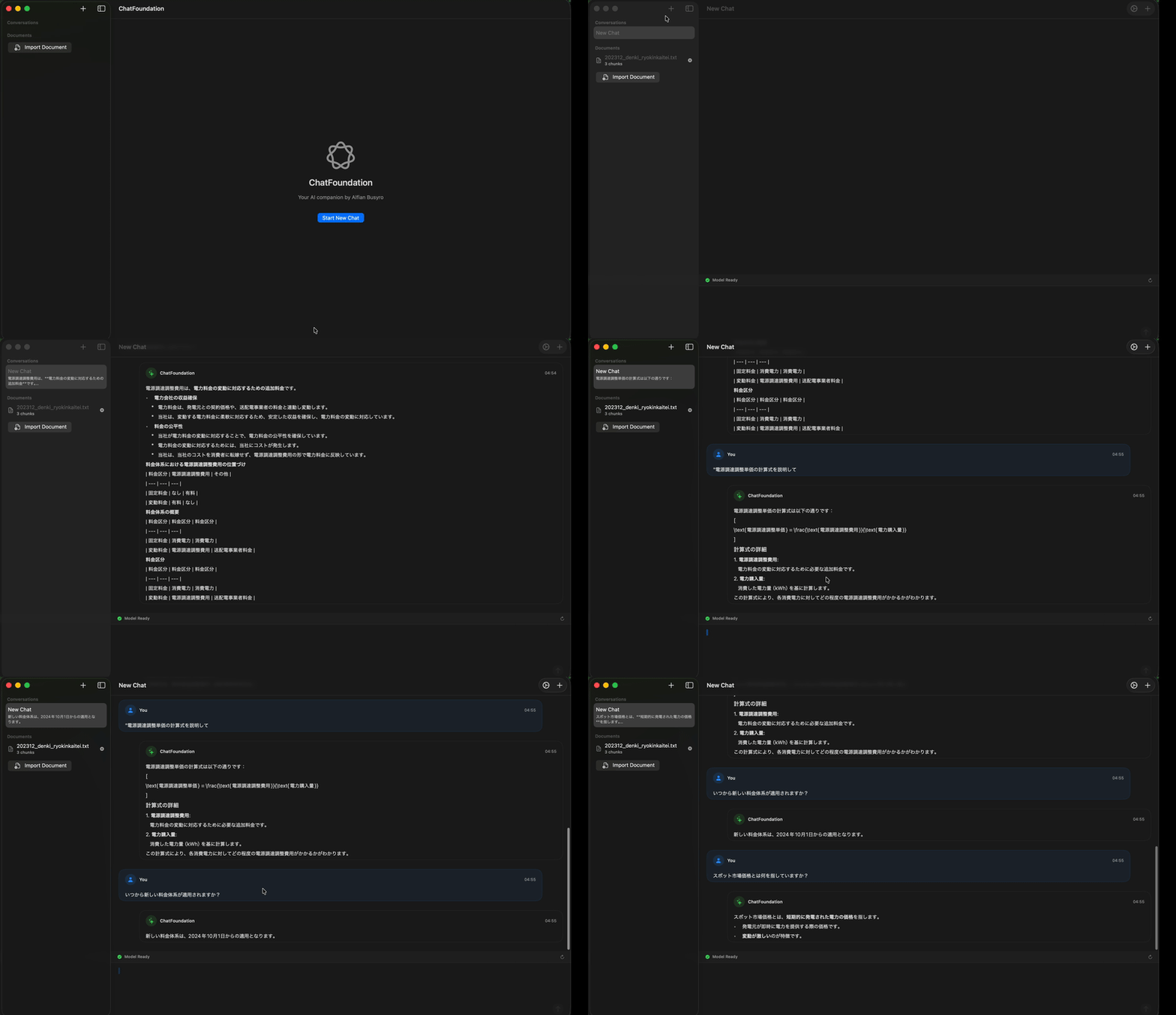
Introduction
The FoundationModels framework that Apple released with macOS 26.0 is a groundbreaking API: it gives you direct access to a large language model (LLM) that runs locally on Apple Silicon.
In this post I walk through the whole development of FoundationLLMChat, a native macOS app with RAG (Retrieval-Augmented Generation) built in.
What the app does
“Talk directly with your documents”
- Import PDFs and text files into the app
- Ask questions about a document, and the LLM answers with the document’s context in mind
- Everything runs locally (no internet needed, privacy fully protected)
- Fast on Apple Silicon
I explain the technical architecture, how the RAG system is implemented, and the problems I ran into and how I solved them.
Project overview
FoundationLLMChat is a next-generation chat app that lets you have a “conversation” with your documents.
Main features
| Feature | Description |
|---|---|
| RAG document chat | Import PDF/text files, then ask and get answers about their content |
| Apple Intelligence | The local LLM in macOS 26.0+ (no internet needed) |
| SwiftData persistence | Conversation history and documents are saved automatically |
| Keyword-based RAG | A search and context-building system I wrote myself |
| PDF support | Text extraction with PDFKit |
| Markdown rendering | Supports code blocks, lists, and tables |
Tech stack
| Component | Technology |
|---|---|
| UI framework | SwiftUI |
| Data persistence | SwiftData |
| LLM inference | FoundationModels (Apple Intelligence) |
| PDF processing | PDFKit |
| Concurrency | async/await + MainActor |
Architecture
Using MVVM
The app uses the MVVM (Model-View-ViewModel) architecture. It keeps UI logic and business logic clearly separated, which makes the code easier to test and maintain.
View (SwiftUI) → ViewModel → Service → Apple FrameworksArchitecture diagram
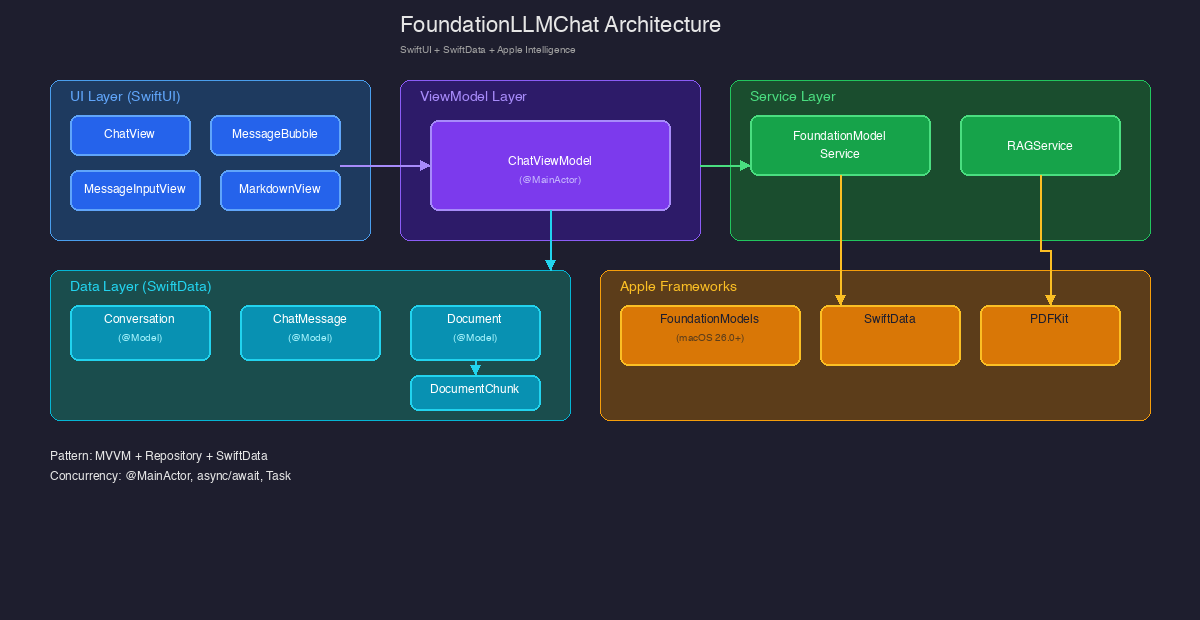
The diagram shows these five layers:
- UI Layer (SwiftUI): ChatView, MessageBubble, MessageInputView, MarkdownView
- ViewModel Layer: ChatViewModel (MainActor), for state management
- Service Layer: FoundationModelService, RAGService
- Data Layer (SwiftData): Conversation, ChatMessage, Document, DocumentChunk
- Apple Frameworks: FoundationModels, SwiftData, PDFKit
The layers
1. UI Layer (SwiftUI)
ChatView: the main chat screenMessageBubble: shows messages as speech bubblesMessageInputView: the message input fieldMarkdownView: Markdown rendering
2. ViewModel Layer
ChatViewModel(MainActor): manages state and coordinates the business logic- Conversation management
- Sending and receiving messages
- RAG control
- Error handling
3. Service Layer
FoundationModelService: a wrapper around the Apple Intelligence APIRAGService: document search and context building
4. Data Layer (SwiftData)
Conversation: the conversation entityChatMessage: the message entityDocument: the document entityDocumentChunk: a chunk of a document
5. Apple Frameworks
- FoundationModels: LLM inference
- SwiftData: data persistence
- PDFKit: PDF text extraction
The RAG (Retrieval-Augmented Generation) system
What is RAG?
RAG is a way to give an LLM outside knowledge. You search for the parts of your documents that relate to the user’s question and add them to the prompt, so the model can give a more accurate answer that fits the context.
How this app implements RAG
Document processing flow
PDF/Text → text extraction → chunking → keyword extraction → save to SwiftDataChunking algorithm:
func chunkDocument(chunkSize: Int = 1000, overlap: Int = 200) -> [DocumentChunk] {
    var chunks: [DocumentChunk] = []
    let text = content
    var startIndex = text.startIndex

    while startIndex < text.endIndex {
        let endIndex = text.index(startIndex, offsetBy: chunkSize, limitedBy: text.endIndex) ?? text.endIndex
        let chunkText = String(text[startIndex..<endIndex])

        let chunk = DocumentChunk(content: chunkText, index: chunks.count, document: self)
        chunks.append(chunk)

        // Set the next start position, taking the overlap into account
        if endIndex == text.endIndex {
            break
        }
        startIndex = text.index(startIndex, offsetBy: chunkSize - overlap, limitedBy: text.endIndex) ?? text.endIndex
    }

    return chunks
}
Search algorithm
Search is keyword-based.
func retrieveRelevantChunks(query: String, documents: [Document], maxChunks: Int = 3) -> [DocumentChunk] {
    let queryWords = query.lowercased()
        .components(separatedBy: CharacterSet.alphanumerics.inverted)
        .filter { $0.count > 2 }

    var scoredChunks: [(chunk: DocumentChunk, score: Int)] = []

    for document in documents {
        for chunk in document.chunks ?? [] {
            var score = 0
            let chunkContent = chunk.content.lowercased()

            // An exact match scores high
            if chunkContent.contains(query.lowercased()) {
                score += 10
            }

            // Match per word
            for word in queryWords {
                if chunkContent.contains(word) {
                    score += 1
                }
            }

            // Match against the keyword list
            for word in queryWords {
                if chunk.keywords?.contains(word) == true {
                    score += 2
                }
            }

            if score > 0 {
                scoredChunks.append((chunk, score))
            }
        }
    }

    // Sort by score and return the top results
    let sortedChunks = scoredChunks.sorted { $0.score > $1.score }
    return Array(sortedChunks.prefix(maxChunks).map { $0.chunk })
}
Scoring:
- Exact match: +10 points
- Word match (in the content): +1 point
- Keyword list match: +2 points
Processing flow
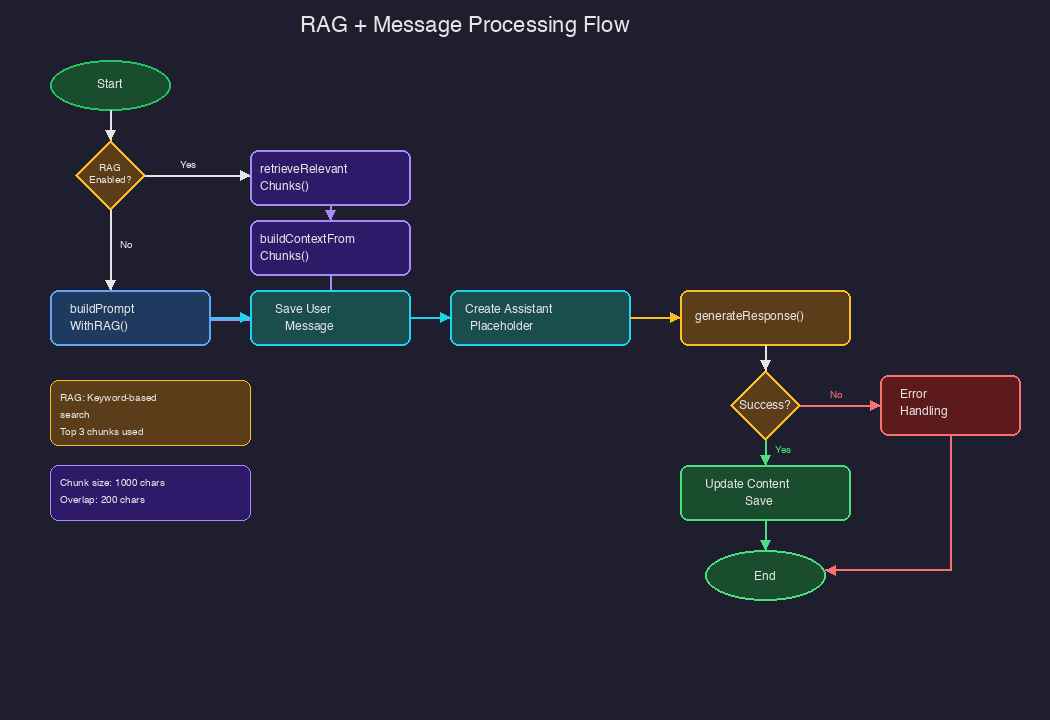
The RAG and message processing flow works like this:
- Receive the user’s input
- Check whether RAG is enabled
- If yes: retrieveRelevantChunks() → buildContextFromChunks()
- Build the prompt with buildPromptWithRAG()
- Save the user’s message
- Create a placeholder for the assistant’s reply
- Run LLM inference with generateResponse()
- On success: update and save the content
- On failure: handle the error
User sequence
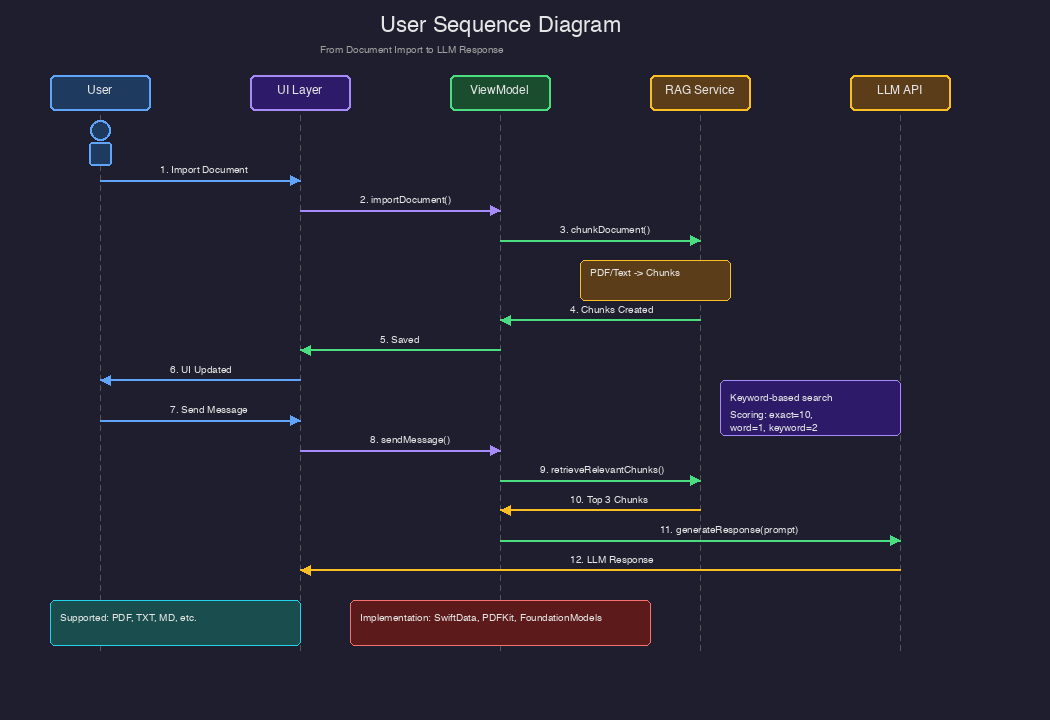
Here is the sequence from importing a document to getting an answer from the LLM.
Phase 1: Importing a document (1-6)
- The user picks a PDF or text file
- The UI layer notifies the ViewModel
- The ViewModel splits the document into chunks
- The chunks are saved to SwiftData
- The UI updates and shows the document list
Phase 2: Sending a message with RAG (7-12)
- The user sends a message
- The ViewModel saves the message
- The RAG service searches for related chunks
- The top 3 chunks are returned
- The prompt (including the RAG context) is sent to the LLM
- The LLM’s response comes back and is shown in the UI
Problems I hit and how I solved them
Problem 1: Checking whether FoundationModels is available
The FoundationModels framework needs macOS 26.0+ and Apple Silicon.
Solution: conditional compilation
#if canImport(FoundationModels)
import FoundationModels
// The real implementation
#else
// Fallback implementation
class FoundationModelService {
    @Published var availabilityStatus: ModelAvailabilityStatus = .unavailable(
        reason: "FoundationModels framework not available. Requires macOS 26.0+ and Apple Silicon."
    )
}
#endif
Problem 2: SwiftData model relationships
I had to set up the one-to-many relationship between Conversation and ChatMessage correctly.
Solution: set the relationship and its inverse
@Model
class Conversation {
    @Relationship(deleteRule: .cascade, inverse: \ChatMessage.conversation)
    var messages: [ChatMessage]?
}

@Model
class ChatMessage {
    @Relationship
    var conversation: Conversation?
}
With deleteRule: .cascade, deleting a conversation also deletes its messages.
Problem 3: Updating the UI on the main thread
SwiftUI @Published properties must only be updated on the main thread.
Solution: apply @MainActor
@MainActor
class ChatViewModel: ObservableObject {
    @Published var isGenerating: Bool = false
    @Published var errorMessage: String?
    // ...
}
Problem 4: Handling the response asynchronously
FoundationModels doesn’t support streaming responses directly yet, so updating the reply as it arrives was a challenge.
Solution: a placeholder message
// First, create an empty placeholder
let assistantMessage = ChatMessage(role: .assistant, content: "", conversation: conversation)
assistantMessage.isStreaming = true
context.insert(assistantMessage)

try await context.save()

// Generate the response asynchronously
Task {
    let response = try await modelService.generateResponse(for: prompt)

    // Update with the response
    assistantMessage.content = response
    assistantMessage.isStreaming = false
    try context.save()
}
Performance tuning
RAG tuning
Chunk size: I use 1,000-character chunks with a 200-character overlap. That keeps context continuous across chunks while improving search accuracy.
Limiting search results: only the top 3 chunks are used, which keeps the prompt small and cuts latency.
Database tuning
// Only the 10 most recent messages go into the prompt
let recentMessages = conversation.sortedMessages.suffix(10)
What’s next
Publishing on GitHub
I’m still preparing the repository, and I plan to publish it soon.
Planned features
Semantic search: I plan to move from the current keyword-based search to embedding-based search. Generating embeddings locally with Core ML should make search much more accurate.
Streaming: as soon as the FoundationModels streaming API is available, I’ll add support for it.
Multimodal input: I’m looking into supporting image input.
Export: I also plan to add exporting conversation history to Markdown and PDF.
Summary
FoundationLLMChat combines Apple’s latest technology (FoundationModels, SwiftData, and SwiftUI) to offer powerful LLM features while keeping your data completely private.
Because RAG lets it use your documents as context, it’s more than a chat app: it’s a tool for talking with your personal knowledge base.
What I learned
- SwiftData is powerful: declarative data modeling and automatic persistence make complex data management simple to write
- FoundationModels has real potential: local inference gives you both privacy and fast responses
- MVVM matters: keeping state management clearly separated makes the code much easier to maintain
- RAG doesn’t have to be fancy: even keyword-based search can be accurate enough in practice, with some tuning
References
This post was written in April 2026. The FoundationModels API is in beta, so it may change.
Comments
Comments live in GitHub Discussions. Loading them connects this page to giscus.app.