Introduction
Every time I start a new project, the preparation before writing any code eats a lot of time. Sorting out requirements, making a scaffold, setting up CI, preparing a test environment. I “just want to try something”, and before I know it the whole day has gone on setup.
I use coding agents every day, at work and on personal projects, and I wondered whether I could hand this part off too. So I built a skill that automates starting a new project from end to end. Since I started using it, for work prototypes and personal ideas alike, I can go straight to having something that runs on the same day I thought of it.
In this post I explain how I designed this skill, and what I learned and improved while using it. The architecture is general, so you should be able to build the same thing with Claude Code or any other agent.
Background: AI is fast at implementation, but projects are still slow
Where AI-driven development helped most was adding features to an existing codebase. But I’d noticed that starting a new project from scratch was the one place it didn’t get much faster.
Breaking down the causes:
- Starting with “build an app” falls apart. The agent doesn’t ask enough questions before implementing. It fills in the stack choice and the reading of the requirements with guesses, and you tend to get “something that looks right”
- No record of the design remains. What was decided in chat gets buried, and later you can’t trace “why is it built this way?”. There’s no handover material and no design document
- “It works” is vague. It counts as done once it runs on your machine, and tests and E2E get pushed back
- The fix loop has no structure. You fix a bug on the spot, something else breaks, you fix that. Nobody chases the root cause, so the same place gets touched again and again
In short, the single move, implementation, became super fast, but I’d been lazy about designing the whole sequence of moves that starting a project takes. Starting a project is really a chain of steps: interview → design → implementation → testing → verification. Yet I’d only handed the AI the “implementation” part.
The proposal: put the whole project-setup process into one skill
So I built a skill that goes from asking about requirements all the way to verifying the app works, in fixed steps. The user just says “I want a project like this”, and it runs these steps in a fixed order and format:
- Interview: a thorough interview that leaves no assumptions
- Plan: the implementation plan, written to a file as
PLAN.md - Diagrams: an architecture diagram, flowcharts, and wireframes
- Confirmation: get a human’s approval before implementing
- Implementation: implement in the order of the plan’s milestones
- Testing: unit → E2E → agent verification
- Fix loop: if anything breaks, rerun all three layers
The key is that every step has a defined exit condition. That’s what separates this from a pile of prompts.
The overall flow
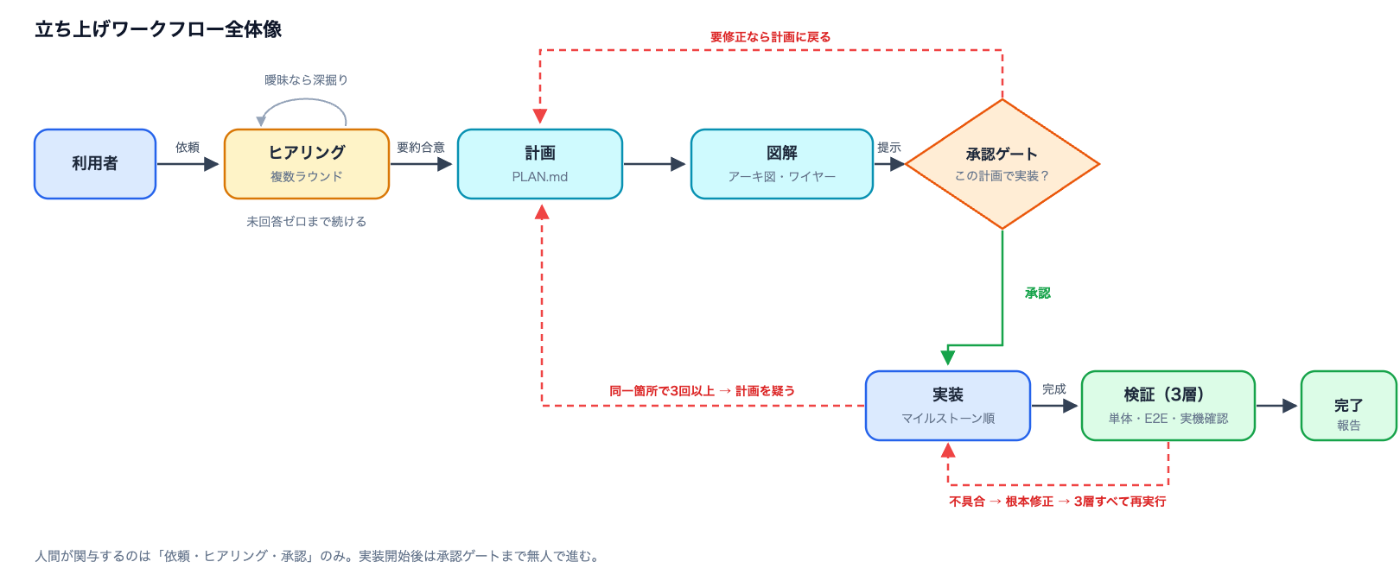
PLAN.md) and diagrams, then an approval gate (“implement with this plan?”). After approval: implementation in milestone order, three-layer verification (unit, E2E, hands-on check), and done. A failure triggers a root-cause fix and a rerun of all three layers; three or more loops in the same place sends you back to the plan. Humans are only involved in the request, the interview, and the approval.The flow is simple. It keeps talking in the interview until we agree, then generates PLAN.md, an architecture diagram, and wireframes. A human approves only once, right before implementation starts; after that, implementation → three-layer verification → fixes run non-stop.
If verification finds a problem, it fixes the root cause and reruns all three layers. Only if it loops three or more times on the same area does it doubt the plan itself instead of the implementation, and go back to PLAN.md.
What mattered most in the design, part 1: making the interview finish
In the first version, the interview was a weak step: “ask a few questions, then write the plan”. As soon as I used it, it was obvious that agents can’t hold back from starting. Asked to “build a dashboard”, it doesn’t ask enough about what kind of dashboard; it fills in the gaps with guesses and gets going.
So I wrote these rules into the interview step:
- Don’t write the plan until no assumptions are left. The condition for starting
PLAN.mdis “zero unanswered questions” - Ask multiple-choice questions. Not free text, but batches of 3 to 5 questions with options
- Dig into vague answers. “Something like Notion” doesn’t count as an answer
- The exit condition is a matching summary. It sums up what it understood in 3 or 4 sentences, and moves on once we agree
That changed the structure from “ask once at the start, then charge ahead” to “keep talking until we agree”. It usually takes 2 to 4 rounds of questions, but those few questions make a big difference to how accurate the later steps are.
What mattered most in the design, part 2: putting the plan in a file
The results of the interview go into PLAN.md.
Give every requirement an ID and enforce traceability
Each functional requirement gets an ID like [FR-1], and every FR must link to at least one milestone task, one test, and one acceptance criterion.
[FR-3] Users can save an article as a draft
  → M2 "Implement the save-draft API"
  → Unit test "draft_service_test.py"
  → E2E "save draft → resume → publish"
  → Acceptance criterion "draft state is persisted and can be resumed"
That cuts down on features that were implemented but that nobody checked. The test strategy refers to FR IDs too, so anything missing shows up as a gap.
When reality and the plan disagree, fix the plan first
It’s normal to find a wrong assumption during implementation. When that happens, the rule is update PLAN.md first, then fix the code.
Without that rule, the plan quickly becomes a dead document. The rule is there so PLAN.md is treated not as “something you read before starting” but as the always-current source of truth.
What mattered most in the design, part 3: showing the design as images
I made it a rule that the architecture diagram, application flow, and wireframes are generated as images, not Mermaid or ASCII. A subprocess with an image-generation tool does it, and saves PNGs to docs/diagrams/.
The reason: text diagrams are easy to skip over. The generated images are also shown inline in the terminal, so you notice when something about the design looks off the moment you see it.
If the image tool isn’t available, it falls back to SVG. Even if an external dependency is down, the process doesn’t stop, and a minimum version of the output is guaranteed. That fallback path turned out to matter a lot in real use.
Human-in-the-loop in just one place
In the full workflow, human approval is required in only one place: before implementation starts. The interview continues until we agree, but once implementation starts, the testing, verification, and fix loops don’t stop to ask.
Putting “can I go on?” between every step waters down the automation, while going back to the design after implementation has started is expensive. So only the boundary between plan and implementation is a human-in-the-loop gate.
Three layers of verification, to build an agent you can trust
The part of this skill I think matters most is verification. My thinking here was strongly shaped by Lauren Tan’s talk on AI coding agents.
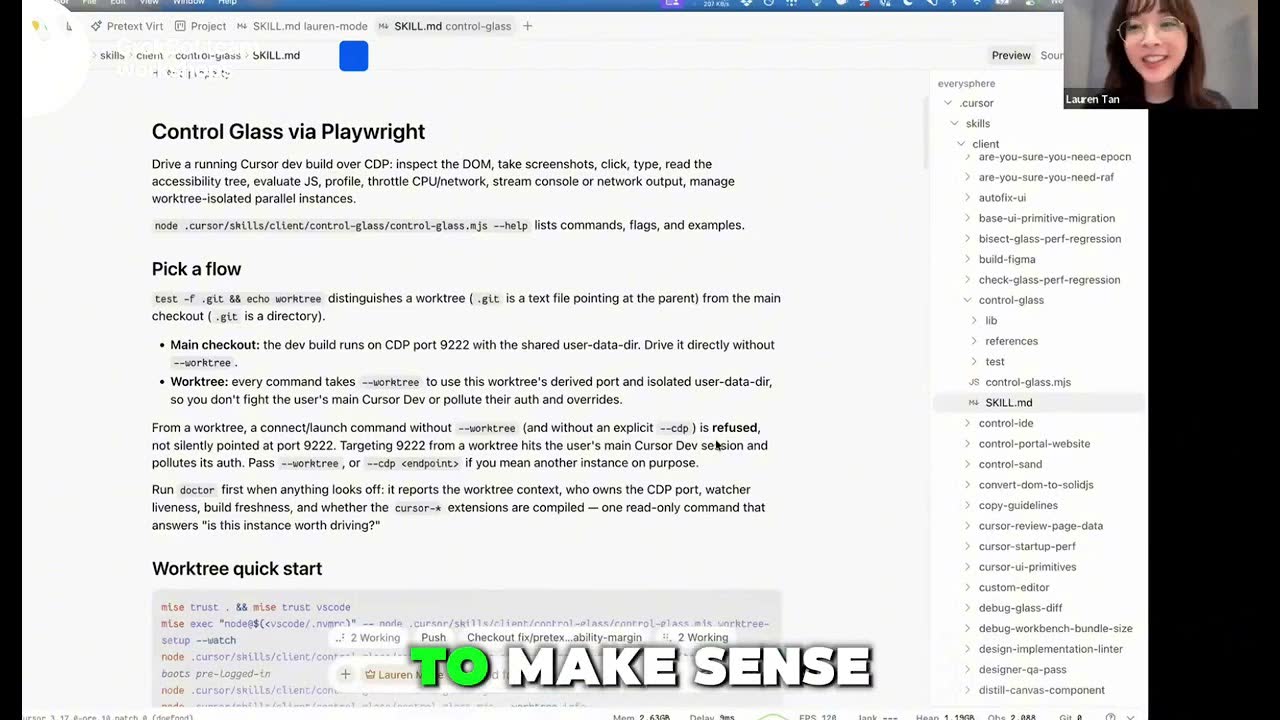
What stuck with me most from the talk was this idea: to make use of agents in AI-driven development, you have to be able to trust them, and for that you have to improve the agent’s own ability to verify its work. If a human carefully checks every piece of generated code, then no matter how fast the AI implements, the human becomes the bottleneck in the end.
So I turned that idea into my own workflow as three layers: unit / integration tests → E2E tests → hands-on checks by the agent.
| Layer | What it does | What it catches |
|---|---|---|
| Unit / integration tests | Run everything with the standard test runner; add tests for any FR that isn’t covered | Logic correctness |
| E2E tests | Drive user journeys automatically, e.g. Playwright for the web | Broken screen flows and integration |
| Agent verification | Start the app and actually use the main flows, the way a human would | Whether it really works, beyond what tests catch |
The talk didn’t present this three-layer structure itself. What I took from Lauren Tan was the idea that to trust an agent, you need to improve the agent’s own ability to verify. These three layers are how I made that concrete for my AI-driven development flow.
Why the third layer is needed
The third layer is unglamorous, but it helps the most. It’s normal for everything to pass and the app still not work. Differences between mocks and the real environment, missing environment variables, broken rendering: problems remain that automated tests can’t pick up.
So at the end, the agent itself has to start the app, use it, and check it against the acceptance criteria. The report format is fixed too:
✓ Can log in
✓ Can create an article
✓ Can resume editing after saving a draft
✗ The redirect after publishing doesn't match the spec
“The tests passed” is not “done”. It’s only done when the agent has checked the real thing and it matches the acceptance criteria.
After three failures, doubt the plan, not the code
When a bug is found, it’s fixed with these rules:
- Fix the root cause. Patches for symptoms only are not allowed
- After the fix, rerun unit tests, E2E, and agent verification
- Repeat until all three layers are clean
- If it loops three or more times on the same area, go back to
PLAN.md
If fixing the same part again and again keeps causing new problems, the cause is probably upstream rather than in the implementation: the assumptions, the separation of responsibilities, the data structures, the interfaces. So instead of patching forever, the number of fixes becomes a signal to revisit the plan itself.
What actually changed
Three things changed a lot once I started using this skill:
- Projects get off the ground faster. I hand over an idea in the morning, check only the plan, and leave implementation and verification to the agent. Prototyping went from weeks to days
- I see holes in the requirements before implementing. The interview asks “who uses it?”, “what about auth?”, “what happens on failure?”, so ambiguity gets cleared up before any code is written
- “Done” means something different. Passing tests isn’t done; it’s only done after E2E and the hands-on check pass too
I actually think more before implementation now. But since I rebuild things less often later, the total time is shorter.
Summary: a design checklist for a project-setup skill
If you build a similar skill, these are the points to get right:
- Write an exit condition for every step. Define it not as “do X” but as “don’t move on until X is in place”
- Keep interviewing until you agree. Multiple-choice batches also make answering easier
- Put the plan in a file, and make it traceable with requirement IDs. Link FR → milestone → test → acceptance criterion
- Show the design as images. Present it in a form where a human notices when something is off
- Have fallbacks for external dependencies. Don’t let a tool outage stop the process
- Put human-in-the-loop only at important boundaries. Here, just once, before implementation starts
- Verify in three layers. Unit / integration, E2E, and the agent checking the real thing itself
- Build trust in the agent through its ability to verify. Don’t trust it blindly; give it the ability to check its own work
- After three failures in the same area, doubt the plan. Use the number of fixes as a signal to revisit the design
- When reality and the plan disagree, update the plan first. Don’t let
PLAN.mdbecome a dead document
A coding agent on its own is a master of the single move: implementation. But if you write the chain of steps, exit conditions, approval gates, verification, and fix loops into a skill, you can automate the whole sequence of moves that starting a project takes.
And in AI-driven development, I think what matters is not simply trusting the agent, but improving the agent’s own ability to verify, and widening how far you can trust it as a result.
Once you’ve built this system, you can run the same quality of process every time you start a new project. It’s the skill that helps me most in my day-to-day work right now.
Comments
Comments live in GitHub Discussions. Loading them connects this page to giscus.app.