Introduction
Claude Code has a command called /insights. It analyzes your past sessions together and reports things like “this is how you use it”, “this is where you get stuck”, and even “write this in your CLAUDE.md”.
When I ran it, the report hit home. From dozens of sessions’ worth of logs, it confronted me, with numbers, with habits I’d half noticed. And the suggestions were concrete and ready to copy and paste. Honestly, I wanted to paste them straight into CLAUDE.md.
But I stopped before pasting.
What /insights looks at is past session logs. It doesn’t look at the habits of the model I’m running right now (Claude Opus 5). A prescription worked out backwards from past failure patterns won’t necessarily work on today’s model.
So I compared it, line by line, with the official prompting guide for Opus 5. The result: I adopted half of the suggestions and threw away the other half. And the ones I threw away weren’t “doesn’t help”; they were “makes it worse”.
This post is the record of that comparison.
What /insights confronted me with
First, what the report said. The main findings looked like this:
| Finding | Details |
|---|---|
| Wrong approach | 27 cases. Ran off in the wrong direction, then had to redo the work |
| Misread request | 17 cases. Was working on the wrong target to begin with |
| Giving up too early | The AI concluded something was impossible, and even built a workaround on that assumption |
| Stopping halfway | Only verified, then said “done”, without deploying or committing |
| Unrequested extras | “Do this” became “while I was at it, I also looked into this” |
| Tool ratio | Shell commands ran more than 20x as often as file reads |
The most interesting finding was this one: “When the AI says it can’t do something, pushing back usually gets it done.”
The logs really did show that scene several times. The AI concluded about some tool that “this feature is fundamentally impossible”, and even wrote workaround code on that assumption. I replied with one line, “but it works in another tool, right?”, and it turned out the root cause was somewhere else entirely, and the thing just worked. Similar patterns showed up several times.
The report’s conclusion: “Your pushback is acting as the debugging engine.” It sounds like praise, but what it really means is it only works if a human doubts it every time.
So, which model are those suggestions for?
The report also came with proposed additions to CLAUDE.md. Roughly this lineup:
- Verification rule: “Before writing ‘verified’, always rerun the command and paste the output”
- Use subagents: “Form three root-cause hypotheses, and have three subagents test them in parallel”
- No backups: “Don’t create
.bakfiles. Delete them automatically with a hook” - Scope control: “Only do what was asked”
- Finish line: “Don’t stop at verification. Deploy and commit”
Suggestions 1 to 3 were each direct prescriptions for situations I’d really struggled with, so they felt convincing.
But here’s what I noticed. These prescriptions were written assuming “the AI skips verification”, “the AI doesn’t work in parallel”, and “the AI creates unnecessary files”. That’s the picture reflected in the past logs, and not necessarily what today’s model is like.
So I went and read the official guide.
To give the conclusion first, here’s how the comparison came out:
/insights suggestion | What the official guide says | Verdict |
|---|---|---|
| Make it redo verification every time | Explicit verification instructions should be removed | ❌ Nearly the opposite |
| A three-subagent hypothesis race | Don’t use delegation to verify your own work | ❌ Rejected |
| A hook that blocks backups | (A settings issue in the first place) | ❌ Out of scope |
| Scope control | The model tends to widen scope; a recommended prompt exists | ⭕ Adopted, using the official wording |
| Spelling out the finish line | Give the complete spec up front | ⭕ Adopted |
| An approval gate before starting | Best results come from giving the spec and letting it run | ⚠️ Right diagnosis, swapped the remedy |
Let’s go through them one at a time.
Dropped suggestion 1: “Always make it redo verification”
The official guide says this:
Claude Opus 5 verifies its own work without being told to. If your prompt contains explicit verification instructions (“include a final verification step for any non-trivial task,” “use a subagent to verify”), remove them: instructions like these cause over-verification on Claude Opus 5, and removing them reduces wasted tokens with no loss in quality.
In other words, Opus 5 verifies on its own without being told. Add “always verify” on top, and it multiplies with the model’s built-in behavior, so it runs the same check over and over. Only the token count grows; the result doesn’t change.
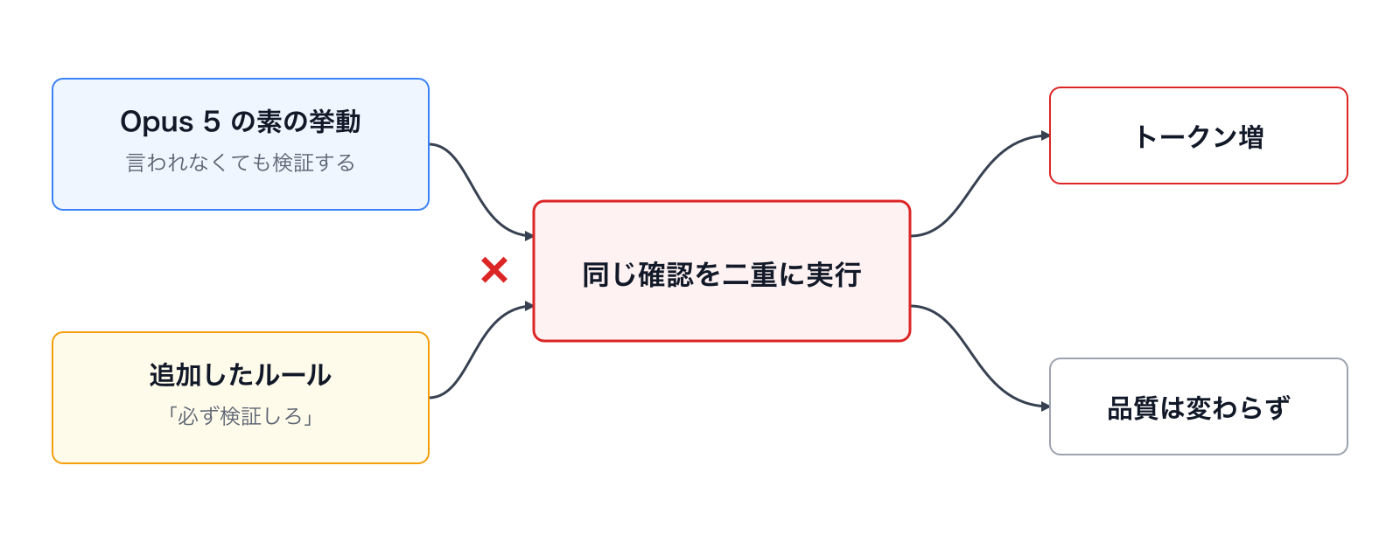
The point is that it multiplies rather than adds. Rules that make up for something the model doesn’t do help, but rules that emphasize something the model already does just double it up.
The /insights suggestion was the exact opposite: “rerun every time and paste the output”. If I’d pasted it in as-is, all I’d have gotten was more wasted reruns.
The problem I was struggling with was real, though. The AI said “I confirmed the deployment” when it actually hadn’t. What matters here is that the problem was not “it didn’t verify” but “it said it verified when it didn’t”.
So I rewrote the rule, from an instruction to verify into an instruction to report accurately:
Do not write "verified" or "deployed" unless the command output is in this
session. If you could not check, write "unverified: <reason>". Do not add
extra verification passes to satisfy this rule; just label accurately.
The last sentence is the key. Without it, the model ends up thinking “then let’s go check” and slides back into over-verification. The point was to lean toward “be honest” instead of “do it”.
Dropped suggestion 2: “A three-subagent hypothesis race”
This was the report’s headline suggestion. When a bug appears, form three root-cause hypotheses and have three subagents investigate them in parallel, each told to disprove its own hypothesis. The human just compares the evidence that comes back.
Honestly, I think it’s a cool idea. It looks like it could automate the role of the human who kept pushing back every time.
But the official guide says this:
Claude Opus 5 delegates to subagents more readily than prior models. Delegation pays off on genuinely independent, sizeable tracks of work, but it multiplies cost and time when applied to small tasks.
And the recommended prompt example includes this sentence:
do not use subagents to verify or double-check your own work.
The hypothesis race is exactly this “use subagents to verify your own work” pattern. On top of that, Opus 5 already tends to delegate too much. It was a suggestion to step on the accelerator in a direction that grows on its own if you leave it alone.
Most of the investigations I actually run aren’t that big. Spinning up three agents every time for something a few commands can narrow down just triples the cost.
So instead, I added a rule that limits delegation. The official recommended wording works almost as-is:
Delegate to a subagent only for large tasks that are genuinely independent
and parallelizable, such as a wide multi-file investigation. Do not delegate
work you can finish yourself in a handful of tool calls, and do not use
subagents to verify or double-check your own work. If one subagent can
complete the task, use one rather than several, and keep spawn counts low.
Dropped suggestion 3: “Don’t create backup files”
The third one was a different kind of problem altogether.
The report suggested: “Make it stop creating .bak files. Delete them automatically with a hook.” It’s true that the logs showed me saying “don’t make backups” many times.
But when I looked into it, there was a rule in a higher-level setting of my environment that said “create a backup before overwriting”. In other words, the AI was just following instructions. And that rule had already been narrowed in scope after those earlier exchanges.
Adding a hook to delete the files automatically would have put the settings and the behavior in a head-on fight. It wasn’t a problem to fix with a prompt; it was a problem to fix in the settings.
This isn’t about blaming /insights. It’s about how it works: the logs only record the fact that “the user made the same complaint four times”. They can’t show that the cause of the complaint was in the settings.
The lesson: what looks like “the AI’s behavior” is sometimes “a rule you wrote yourself”. Sometimes it’s faster to reread your existing settings before adding to the prompt.
The suggestions I adopted: scope, finish line, progress updates
On the other hand, some suggestions pointed the same way as the official guide. And the official guide provides wording you can use as-is, so I adopted the official text instead of the report’s.
Scope control. The official guide states it plainly: “Claude Opus 5 can also expand the scope of a task, adding steps that weren’t requested or applying its own judgment about what the task should be.” That’s exactly what I’d been hit by. This is the recommended text:
Deliver what was asked, at the scope intended. Make routine judgment calls yourself, and check in only when different readings of the request would lead to materially different work. If the request seems mistaken or a better approach exists, say so in a sentence and continue with the task as asked rather than quietly narrowing, widening, or transforming it. Finish the whole task, and stop short of actions that are clearly beyond what was asked.
Finish line. This is more about how I work than about the official guide, but the “stops at verification and says done” problem was simply that I had never written down what “done” means. Tests pass, only the changed files are deployed, the result is fetched again and checked, and it’s committed. Only once that’s written down does “done” mean done.
Progress updates. The official guide states that Opus 5 tends to narrate a lot while it works. There’s a recommended text for this too:
Before your first tool call, say in one sentence what you’re about to do. While working, give a brief update only when you find something important or change direction. When you finish, lead with the outcome
The biggest realization: spec depth beats a confirmation gate
This was the biggest takeaway from the whole comparison.
The strongest recommendation from /insights was this:
Before writing any code, restate the request in your own words, name the files you will change, and present a three-step plan. Wait for the user’s “GO”.
As a prescription for 27 wrong approaches and 17 misreadings, it’s very natural: put a confirmation gate before starting.
But the official guide says Opus 5:
performs best when given the complete task specification up front and left to run.
They’re opposites. One says “stop before you start”; the other says “hand over everything at the start and don’t stop”.
After thinking for a while, I realized both are looking at the same cause: the prompts are too thin.
According to the report, my prompts had become “just dropping a one-line symptom”. That’s exactly right. They looked like this:
Make the category value get selected automaticallyWith that, which object, how to match, what to do when nothing matches, what must not be touched: it’s all left to the AI’s guesswork. If a guess is wrong, the work gets redone. Naturally.
Putting a confirmation gate here doesn’t help, because a plan that comes out of a thin prompt is still thin. It asks, “I’ll change this field on this object, OK?”, and I say “OK”. If the target was wrong, you end up in the same place anyway. All you’ve added is one more round trip.
What I needed to add wasn’t an approval checkpoint; it was depth in the spec.
As a diagram:
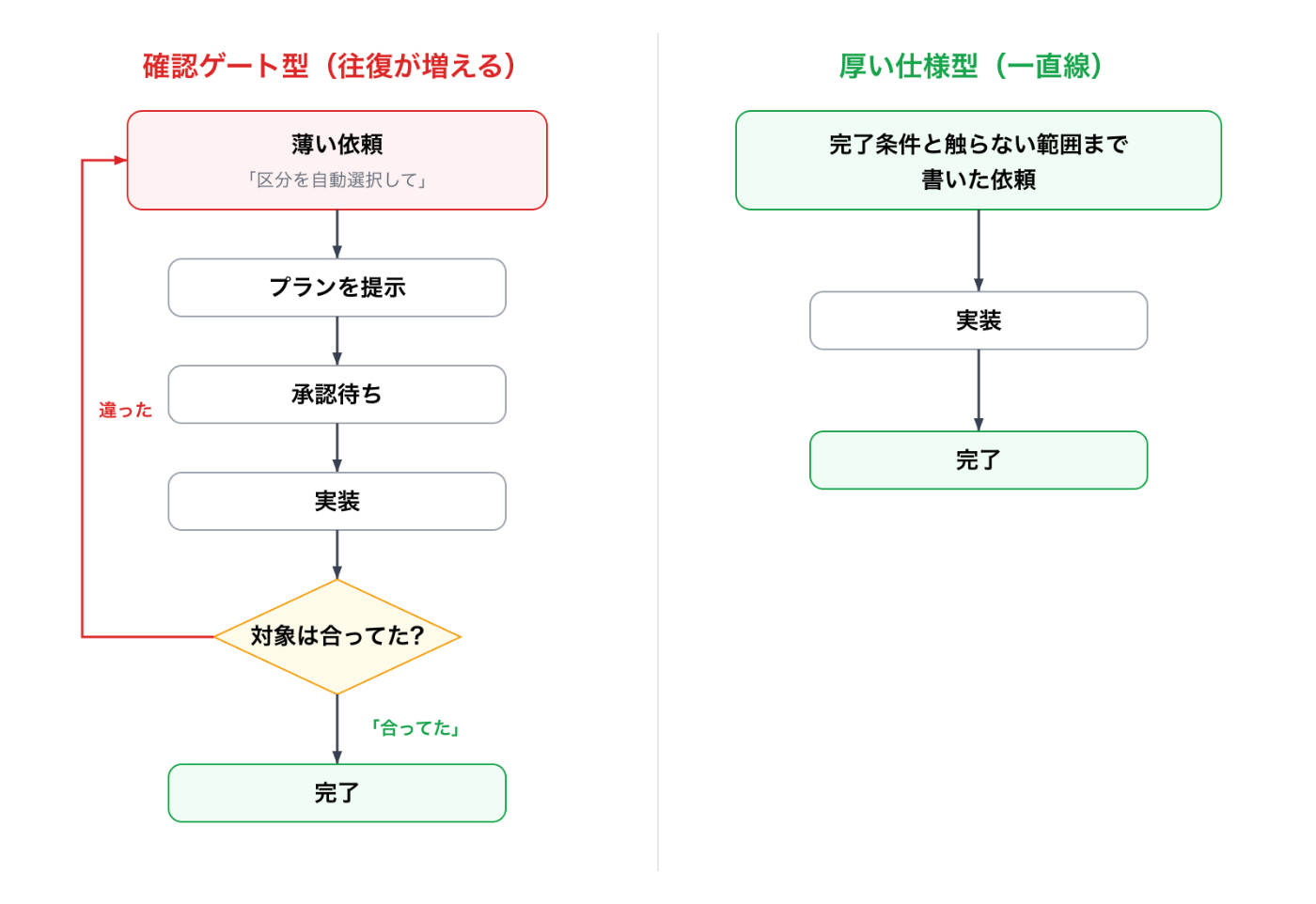
With the approval-gate style, misreading the target adds a whole extra loop. With the thick-spec style, there’s no room to misread in the first place, so it finishes in a straight line. Both aim to reduce rework, but stopping to confirm and deciding everything up front take completely different shapes.
Rewritten, it looks like this:
Target: <field name> on <object name> (a picklist)
Behavior: pick the option that matches the extracted string, ignoring
          differences in case and in full-width/half-width characters
Done when:
  (a) an exact match is selected
  (b) a match is selected even with spelling variations
  (c) when nothing matches, leave it empty and write a log
  (d) <test class name> passes
Out of scope: do not touch other objects or the screen layout at all
That’s only about three more lines. But it removes the “worked on the wrong target, roll everything back” I kept getting hit by, and there’s no waiting-for-approval round trip either. The relationship turned out to be: a thicker spec makes the confirmation gate unnecessary.
So to sum up: /insights’ diagnosis (the prompts are thin) was right; only its prescription (an approval gate) didn’t fit the model.
While I was at it: I’d set effort to xhigh by default
There’s one more thing I fixed after reading the official guide.
Claude Code has an effort setting that adjusts how much the model thinks. I had it at xhigh (nearly the maximum) by default, for the lazy reason that stronger must be better.
The official recommendation was different:
Start with the default (
high) and adjust based on your evals: uselowandmediumliberally as your primary control for token cost and response time wherever quality holds, and step up toxhighfor demanding coding and agentic work.
Most of the work I actually do is small fixes and checking settings.
Matching the kind of work to the setting:
| Kind of work | Before | After |
|---|---|---|
| Small fixes, checking settings, looking things up | xhigh | low to medium |
| Normal implementation and review | xhigh | high (the default) |
| Feature work across many files | xhigh | xhigh (raise it only here) |
Running xhigh all the time on that work doesn’t improve quality; it only adds tokens and waiting time. I set the default back to high, and raise it to xhigh per session only for bigger multi-file work.
The structure is the same here too. “A strong setting always on” is the same kind of mistake as the “make it verify every time” that /insights suggested. Insurance that’s always on just piles up cost.
The rules I ended up writing
After the comparison, this is all I added to CLAUDE.md:
## Scope

Deliver what was asked, at the scope intended. Make routine judgment calls
yourself, and check in only when different readings of the request would lead
to materially different work. If the request seems mistaken or a better
approach exists, say so in a sentence and continue with the task as asked
rather than quietly narrowing, widening, or transforming it. Finish the whole
task, and stop short of actions that are clearly beyond what was asked.

## Delegation

Delegate to a subagent only for large tasks that are genuinely independent
and parallelizable. Do not delegate work you can finish in a handful of tool
calls, and do not use subagents to verify or double-check your own work. If
one subagent can do it, use one rather than several, and keep spawn counts low.

## Definition of done

A task is done when tests pass, only the changed files are deployed to the
approved environment, the result is fetched again and checked, and the change
is committed. Never run only the verification command and call it done.

## Claims

Do not write "verified" or "deployed" unless the command output is in this
session. If you could not check, write "unverified: <reason>". Do not add
extra verification passes to satisfy this rule; just label accurately.

## Progress updates

Before your first tool call, say in one sentence what you're about to do.
While working, give a brief update only when you find something important or
change direction. When you finish, lead with the outcome.
Of the five items /insights suggested, not one survived with its original wording. The three that pointed the right way were swapped for the official text, and the other two were deleted or reversed.
And there’s one rule I deliberately left out: “always investigate before concluding something is impossible”. It’s the direct fix for the “giving up too early” problem that bothered me most. But the official guide says Opus 5 “catches and fixes its own mistakes well without prompting”, and that re-check instructions “compound with the model’s own behavior and add cost without improving results”. So I decided to watch first, without adding a rule. If it keeps causing trouble, I’ll add one then, with the logs as evidence.
Summary: a checklist for using /insights
/insights is a really good tool. But my conclusion this time was that it isn’t a tool whose output you paste in as-is. To sum up:
/insightsanalyzes past logs; it doesn’t look at what the model is like now. Always check its prescriptions against the official guide for your model- Be suspicious of fixes that assume “the AI is slacking”. A newer model may already do it, and adding instructions overdoes it
- “Be honest” beats “do it”. Verification instructions cause over-verification, but a rule asking for accurate claims has no side effects
- Parallelization suggestions multiply cost. For a model that over-delegates, add a rule that limits delegation instead
- Separate prompt problems from settings problems. The logs only record complaints, so you can’t see when the cause is in your settings
- Spec depth beats confirmation gates. Adding three lines of done conditions and “what not to touch” cuts more rework than adding approval waits
- Insurance that’s always on just piles up cost. Raise effort, and verification, only when you need them
Honestly, right after reading the report I was going to paste all of it in as-is. I only stopped and checked it against the official guide because I turned the report’s own observation, that I have a habit of doubting the AI’s conclusions and pushing back, on the report itself.
That habit worked on the report too.
Comments
Comments live in GitHub Discussions. Loading them connects this page to giscus.app.